Network Configuration
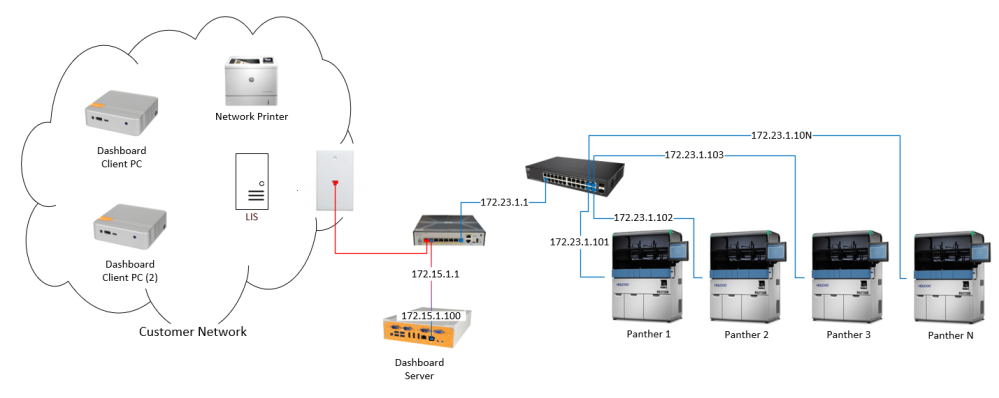

|
Note— Prior to setting up any Network connections, the Networking section of the Panther Site Assessment Form MUST be completed. |
|
|
Panther Link requires the following:
|
If a Panther is connected to an external (customer) network, that Panther MUST have a firewall installed.
There are 2 types of Firewalls currently supported:
- Cisco ASA 5505
- Cisco ASA 5506
Both firewalls will be programed with Firewall Wizard v6.0.1
After the Firewall is programed using the Firewall Wizard, an instructions.txt file will be generated to guide the installation of all hardware.
The instructions.txt file will aid in setting up the IP addresses for all Panther Instruments, the WMS, Line Controller and Dashboard Server.
Follow the steps outlined below to network a Panther (or multiple Panthers).
- Download and Install Firewall Wizard v6.0.1.0
- Connect the Cisco ASA 5505/5506 to FSE Laptop
- Programming the Firewall with Firewall Wizard v6.0.1.0
- Hardware Setup after Firewall has been configured
- Setting a Panther IP Address on the Panther PC
- Network Printing (if required)
- Panther LINK Installation Qualification
Note—If this is an install, continue to Operational Qualifiation (OQ).
 button at the top of the page to send feedback, comments, or change requests.