Parts and Materials Required
- Ball driver or Allen key, 2.5 mm
- Nut driver or wrench, 5.5 mm
- Small flat head screwdriver (optional)
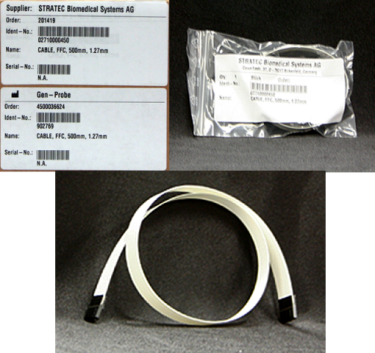
 DISTRIBUTOR, THETA FLEX CABLE
Time Required
- 30 minutes
Removal Procedure
- Put on proper PPE.
- Fold the new Theta flex cable.
- Remove the Luminoeter Injector.
- Carefully open the Service Drawer.
- Slide the distributor head to the left side of the system to allow access to the Z/Theta PCB.
- Remove the 2 nuts that secure the Z/Theta PCB cover. Remove the cover. (Optional - Remove the Transition Incubator to provide easier access to the Z/Theta PCB Cover.)
- Unplug the Theta flex cable from the Z/Theta PCB.
- Unwind the theta flex cable so it is no longer wound around the distributor shaft.
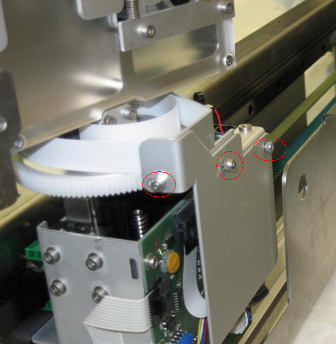
- Unscrew the bracket that secures the Theta flex cable to the hook PCB, being careful to retain the bracket rubber end pads.
- Unplug the Theta flex cable from the hook PCB.
- Remove the Theta flex cable.

Caution—Access is limited. If necessary, CAREFULLY use a small flat head screwdriver to assist with unplugging the Theta flex cable. However, be careful not to damage the Z/Theta-axis PCB with the screwdriver.
Replacement Procedure
|
|
WARNING—Do not unnecessarily bend or fold the flex cable. |
- Plug the Theta flex cable into the hook PCB.
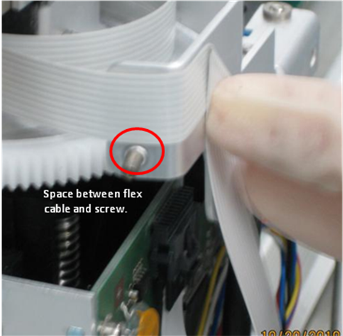
- Secure the bracket that holds the flex cable in place at the hook PCB, ensure the bracket rubber end pads are in place.
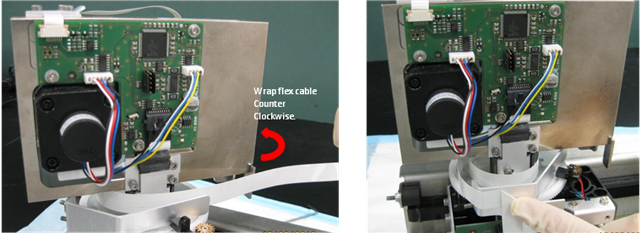
- Route the flex cable down to the Z/Theta PCB by first wrapping the Theta flex cable counterclockwise around the underside of the head. View the following pictures.
- Plug the new Theta flex cable into the Z/Theta PCB.
- Replace the Z/Theta PCB cover. Note the correct positioning of the flex cable in the picture.
Caution—After installing the sheet metal cover, check that the Theta ribbon cable does not contact the distributor head during rotation. 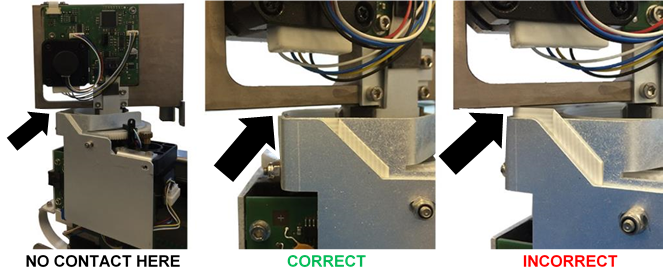
- Close the Service Drawer.
- Reinstall the Luminometer Injector.
- Turn on power to the Panther System.
- Start up Service Software.
 button at the top of the page to send feedback, comments, or change requests.