TCR Carousel Motor Removal and Replacement
Parts and Materials Required
- 2.5 mm ball driver or Allen key
- 4 mm ball driver or Allen key
- Carousel Motor
Time Required
Removal Procedure
- Put on proper PPE.
- Carefully open the Service Drawer.
- At the TCR Carousel PCB, unplug the cable that goes from the TCR Carousel to the COP.
- Note the orientation of the TCR Carousel motor with the electrical connector toward the rear of the system. Unplug the electrical connector from the motor.
 Using the 2.5 mm ball driver or Allen key, loosen the four bolts that secure the belt tensioning bracket and motor to the TCR base plate.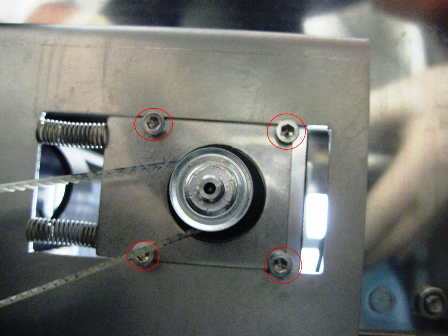
- Push the motor against the spring pressure and remove the belt from the motor cog.
- Carefully remove both auto-tensioning springs and set aside.
- Using the 2.5 mm ball driver or Allen key, remove the four bolts that secure the belt tensioning bracket and motor to the TCR base plate. Set the base plate and screws aside.
- Remove the TCR Carousel motor.
Replacement Procedure
- Insert the new TCR Carousel motor into the same orientation it was in prior to removal and loosely screw in the four bolts to attach the motor to the TCR base plate.
- Carefully re-insert the auto-tensioning springs.
- Slide the TCR Carousel motor and belt tensioning bracket assembly until the auto-tensioning spring is fully compressed.
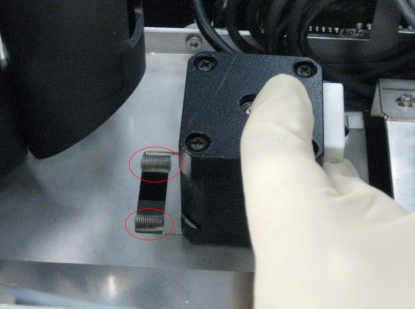
- While the auto-tensioning springs are fully compressed, place the TCR Carousel belt over the TCR motor cog.
- Ensure that the teeth of the belt go around the TCR Carousel motor shaft and the TCR Carousel rotating shaft.
- Release the TCR Carousel motor and belt tensioning assembly so that the auto-tensioning spring is no longer compressed. The slack of the TCR Carousel belt will be removed when the belt is auto-tensioned against the spring force.
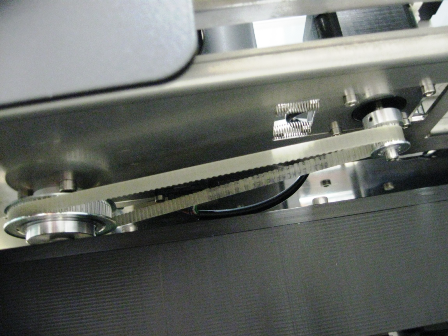
- Using the 2.5 mm ball driver or Allen key, tighten the four bolts that secure the belt tensioning bracket to the TCR base plate.
- Close the Service Drawer.
Verification
- Load a TCR bottle with at least 20 mL of saline on slot 1 of the TCR Carousel.
- Start up Service Software.
- In the main Pipettor tab, select Pipettor, and initialize All Dialog Controlled Modules.
- In service Software, navigate to the Pipettor screen and select the Move tab.
- Pick a tip with the Right Arm.
- In the Right Arm box, select TCR Carousel. Double-click the 1x1 box to move the Pipettor to the TCR Carousel, bottle 1.
- Select Bar to perform a barometric level sense of the TCR.
- Use Service Software to continuously move the TCR Carousel. Observe the belt for noises or interference and for proper tension.
- Carefully close the Service Drawer.
Click the  button at the top of the page to send feedback, comments, or change requests.