Brushless DC (BLDC) Pipettors

|
Abbreviations:
|
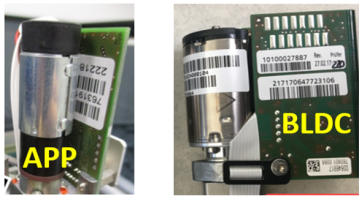
The new BLDC Pipettors have been developed to improve Pipettor reliability.
For Panther Systems, the Sample and Reagent Pipettors MUST be of the same type.
For Fusions Systems, the Panther side (Sample and Reagent Pipettors) MUST be of the same type.
The Fusion Pipettor can be either an APP or BLDC Pipettor.
The BLDC pipettors were cut in on production Panther Systems (classic) P03499, 03510, 03511, P03542 and above.
|
|
Note— BLDC Pipettors can ONLY be installed with System Software v7.1 or higher. |
The table below represents the only viable pipettor configurations for standalone Panther or Panther Fusion systems:
| SYSTEM | Sample Pipettor | Reagent Pipettor | Fusion Pipettor |
| Panther | APP | APP | APP or BLDC |
| Panther Fusion | BLDC | BLDC | APP or BLDC |
Procedure
- Remove the existing Pipettor(s)
- Install the existing Pipettor(s)
- Verify the DIP switch setting is correct for the side of arm intended to be installed.
REAGENT configuration is shown on LEFT below (DIP Switch 1 value is “OFF”).
SAMPLE/FUSION is shown on RIGHT below (DIP switch 1 value is “ON”).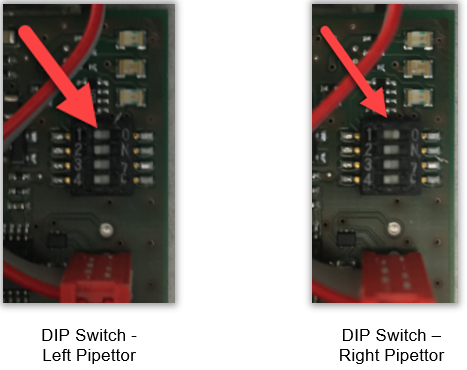
- Cable Retention Bracket Placement
Note— The cable retention bracket placement is critical in ensuring that the cable does not engage with the teeth of the shaft. - Verify that the cable rests entirely within the shaft .
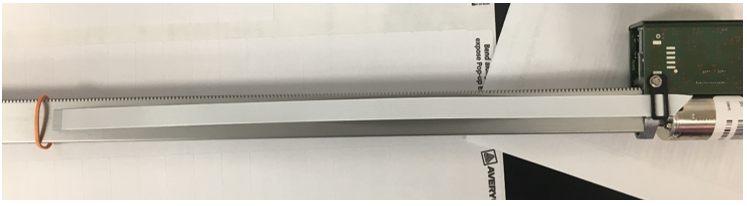
Verify that the cable is NOT over the edges. Loosen the retention bracket to adjust placement as needed.
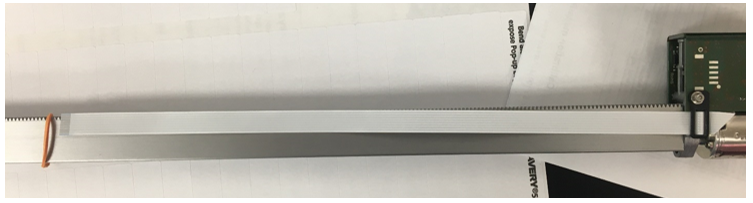
- Verify that the cable rests entirely within the shaft .
-
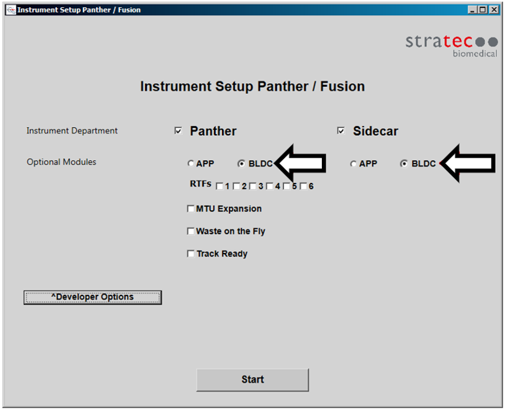
Run Instrument Setup (Firmware). Remember to click on the radio buttons next to BLDC for the Pipettor(s) installed.
Verification
As per DHM-07074, PQs are NO longer required after Pipettor Replacement
- Run the Pipettor Pressure Integrity Test and attach the report to the UCR.
Remember that any value above 0.33 is now accepted as a passing test for the Pipettor Pressure Integrity. - Perform both a cLLD AND bLLD test. Attach the passing cLLD
 Capacitive liquid level detection AND bLLD tests to the Case in CRM.
First complete the cLLD test, then repeat the procedure selecting bLLD.
cLLD tests the capacitive circuit. bLLD will show wear in the piston drive.
 button at the top of the page to send feedback, comments, or change requests.