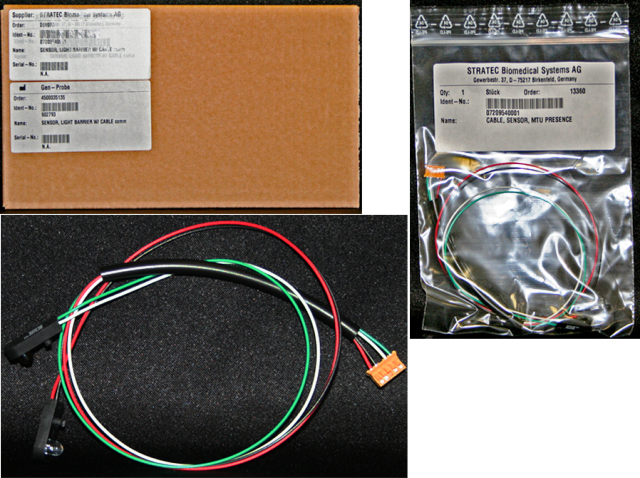
Parts and Materials Required
- Allen wrench, 4 mm
- Small slotted screwdriver
- OUTPUT Q, MTU PRESENCE SENSOR
Time Required
- 45 minutes
Removal Procedure
- Put on proper PPE.
- Remove the Output Queue module.
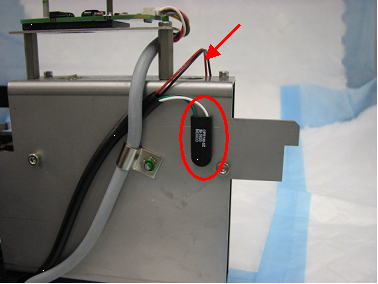
 Locate the MTUMulti-tube unit—Container used to process tests in the instrument. An MTU contains five separate reaction tubes. The MTU is moved through the instrument by the linear distributor and includes five tiplets for pipettiing to be used in the mag wash station. presence sensor transmitter and receiver.
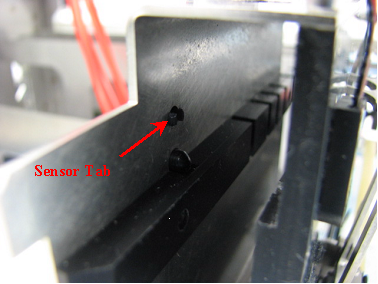
- Using a slotted screwdriver, press slightly against the sensor tab and simultaneously pull on the sensor. Take note of which side of the MTU entrance each sensor is on, darker sensor on left and clear sensor on the right.
- Remove the MTU present sensor connector from the main PCB.
- Remove the MTU present sensor.
Replacement Procedure
- Reverse the removal procedure.
- Verify that connections are properly seated and that screws are all in place.
Alignment/Calibration
Verification
- Perform a System Level Operational Qualification.
- Start the Panther System main software and PrimeOperation of pumping fluid through tubing to ensure proper and consistent fluid delivery (remove air from the tubing, etc.). the system (see the Panther System Operator's Manual).
 button at the top of the page to send feedback, comments, or change requests.