Parts and Materials Required
- Allen wrench, 2.5 mm
- COOLING MODULE, AMBIENT TEMPERATURE SENSOR
Time Required
- 20 minutes
Removal Procedure
- Put on proper PPE.
- Power off the system.
- Open the Universal Fluid Drawer and Service Drawer for easier access to the Cooling Module PCB.
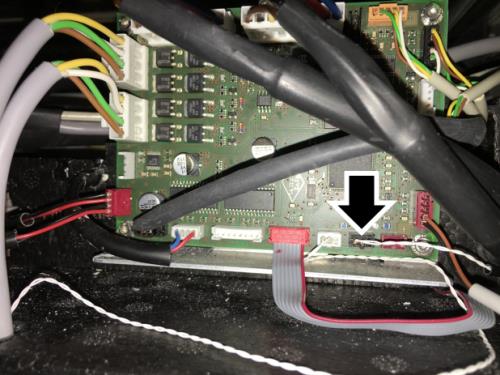
 Locate and disconnect the Ambient Temperature Sensor connector on the PCB.
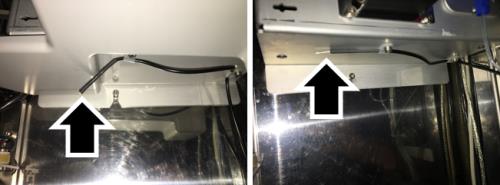
- Locate the Ambient Temperature Sensor underneath the Pump Module. The sensor is held in place with two cable harnesses attached to the bottom of the LCMP housing. Some systens have a drip shield that is also held in place with these screws.
- Remove the two screws securing the sensor (3mm hex) to free the sensor from the Pump Module (and drip shield, if present)
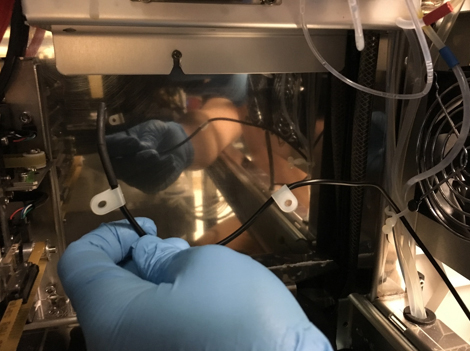
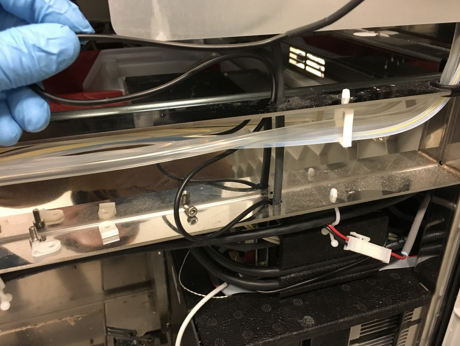
- Note the cable routing. Take photos if necessary to ensure the new sensor is routed in the same way.
- Remove the Ambient Temperature sensor from the system.
Replacement Procedure
- Reverse the Removal Procedure.
- Close the Service Drawer.
 button at the top of the page to send feedback, comments, or change requests.