Configuring the Reagent Bay Barcode Reader
Parts and Materials Required
Time Required
Procedure
- Open Service Software.
- Navigate to the P-Front&Loading tab.
 Under Reagent Scan, press the Read under Scan Configuration. If installing a new scanner, this will display the default configuration.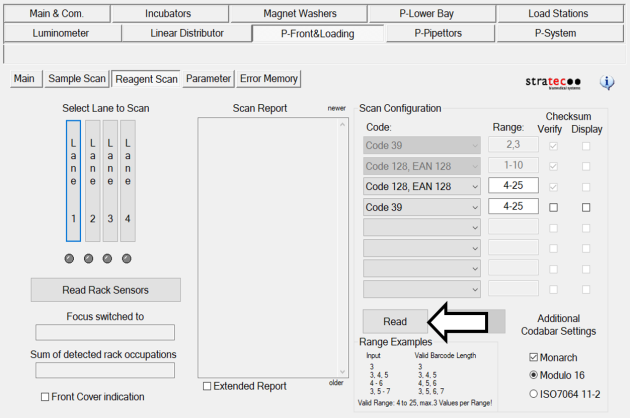
- Verify that the scanner is configured as follows:
| | Code | Range | Checksum Verify | Checksum Display |
|---|
| | Code 39 | 2, 3 | Yes | No |
| | Code 128, EAN 128 | 1–10 | Yes | No |
| | Code 128, EAN 128 | 4–25 | Yes | No |
| | Code 39 | 4–25 | No | No |
- Configure the Additional Codabar Settings by checking the boxes for Start/Stop and Monarch.
- After ensuring that the scanner is configured properly, click the Write button to write this configuration to the barcode scanner's firmware.
- Click Yes.
- Click the Read button once again to confirm that all changes were written.
- If this is an installation, continue to Configure the Sample Bay Barcode Scanner.
Click the  button at the top of the page to send feedback, comments, or change requests.