Parts and Materials Required
- VACUUM PUMP, DUAL HEAD
Time Required
- 30 minutes
Removal Procedure
- Remove the Vacuum Module from the system.
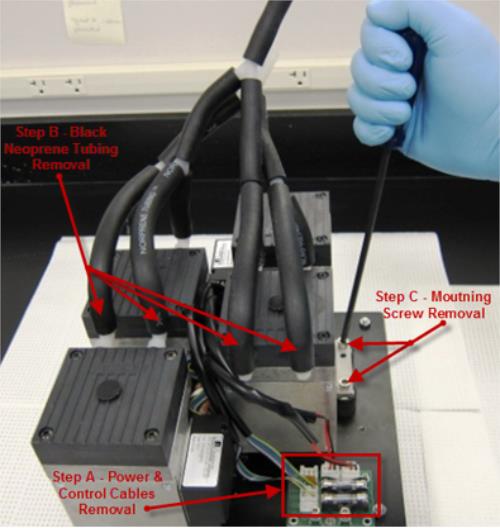
- Disconnect the Power and Control cables from the affected pump (shown as "Step A" below).
- Disconnect the black norprene tubing from the inlet and exhaust ports of the affected vacuum pump (shown as "Step B" below).

Note—Note of the configuration prior to removal to ensure proper replacement.  Remove the four mounting screws (2 per side) from the mounting feet of the affected vacuum pump (shown as "Step C" below).
- Remove the single affected vacuum pump from the sliding base.
Replacement Procedure
- Reverse the process to replace the single vacuum pump spare being installed.
 button at the top of the page to send feedback, comments, or change requests.