Distributor Hook Leveling Instructions
Parts and Materials Required
- Allen wrench, 2.5 mm
- Square object (such as a block of Post-It Notes
Issue
If the Distributor Hook is not level, then auto-teaching of the Distributor will no be accurate.  If the hook is slanted downward during the auto-teaching procedure, the Distributor will falsely sense that the teach pin is higher than it is, as shown in the following (exaggerated) drawing.

If the Hook is mounted at a downward angle, the Z-axis will be taught too high. The effects of this error are most frequently seen at the Chiller Ramp. The error will manifest as a Linear Distributor Theta Motor Lost Some Steps" or "Step Loss" at the Chiller Ramp (positions 18–23, hex).If the Distributor is taught too high, then as it rotates to pick the MTUMulti-tube unit—Container used to process tests in the instrument. An MTU contains five separate reaction tubes. The MTU is moved through the instrument by the linear distributor and includes five tiplets for pipettiing to be used in the mag wash station. out of the Chiller Ramp, the Hook will clip the bottom of the MTU tab, causing the step loss error.
Procedure
- Power down the Panther System.
- Remove the Luminometer Injector.
- Carefully open the Service Drawer.
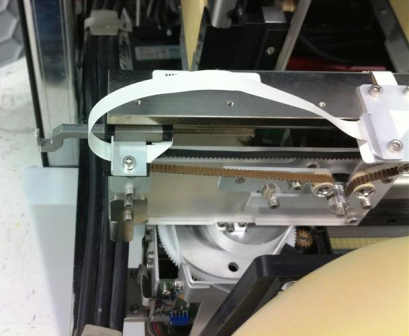
- Manually move the Distributor Head all the way to the left.
- Manually move the Distributor Hook out as far as it will go.
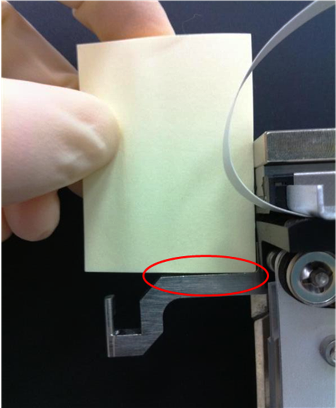
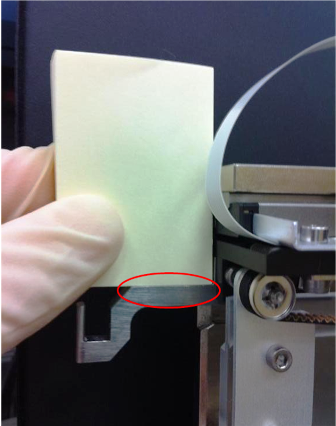
- Using a square object (for example, a block of small Post-It Notes), check the levelness of the Distributor hook.
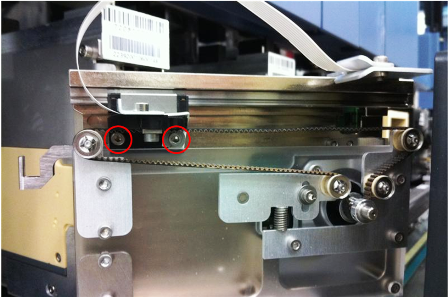
- Adjust the hook levelness by loosening the two hook mounting screws.
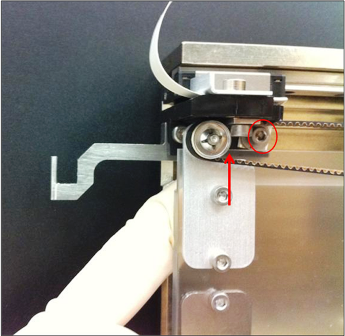
- With the hook extended, push up in the middle of the two screws and tighten the back screw.
- While continuing to push up between the screws, push the hook in partially to allow access, and tighten the second screw.
- Recheck the levelness of the Hook.
- Close the Service Drawer.
- Reinstall the Luminometer Injector.
- Re-teach the Distributor to all modules, starting with the Input Queue.
- Perform two System Level Operational Qualifications and confirm that no step loss errors occur.
 button at the top of the page to send feedback, comments, or change requests.