System
Refer to Common Features for features found on every tab (Communication Status, Buttons).
 Main 1 (tab)
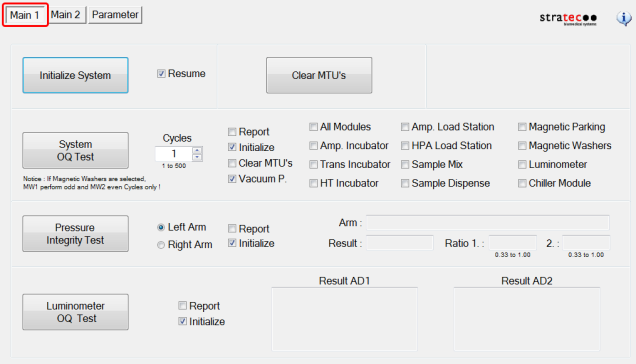
Initialize System
Initializes all modules in the entire system.
Clear MTUs
Clears all MTUs in the system to the Output Queue.
System OQ Test
Completes an OQ Test on all selected modules.
- Enter the number of cycles.
- Check Report to generate a test report.
- Check Initialize to only initialize the modules required to perform the selected test.
Pressure Integrity Test
Completes a Left or Right Arm Pipettor pressure test.
- Select the arm to test.
- Check Report to generate a test report.
- Check Initialize to only initialize the modules required to perform the selected test.
Luminometer OQ Test
Completes an OQ of the Luminometer with a Report.
- Check Report to generate a test report.
- Check Initialize to only initialize the modules required to perform the selected test.
Main 2 (tab)
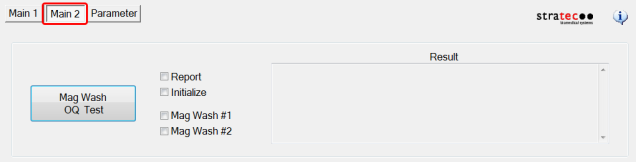
Mag Wash OQ Test
Completes an OQ of either MagwashMagnetic washer.
- Check Report to generate a test report.
- Check Initialize to only initialize the modules required to perform the selected test.
- Select the Magwash to test.
Parameter (tab)
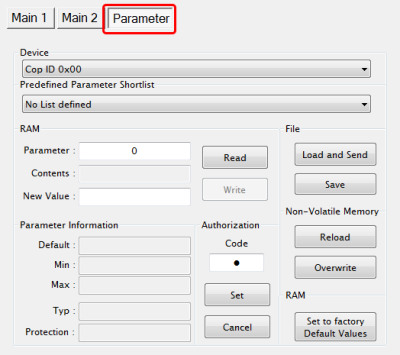
- Display any parameter value of the selected Device by entering a Parameter number and clicking the Read button.
 button at the top of the page to send feedback, comments, or change requests.