Magnet Washer (Magwash)
Refer to Common Features for features found on every tab (Common Control, Communication Status, Buttons).
 Main (tab)
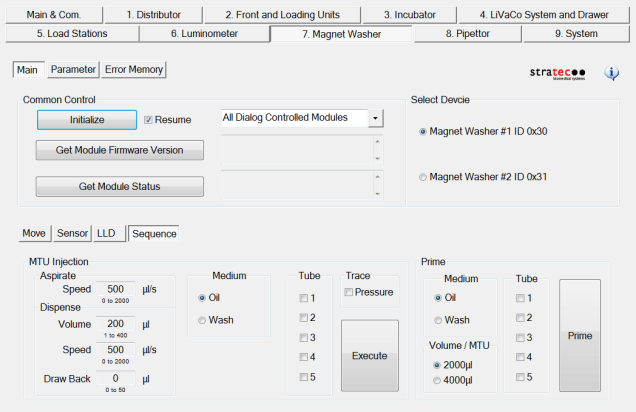
Select Device
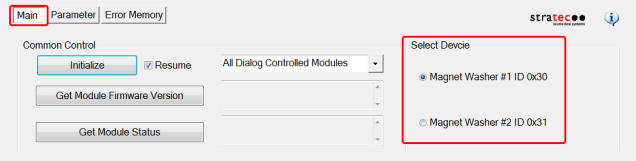
- Select Device (select magwash to be tested)
Move (tab)
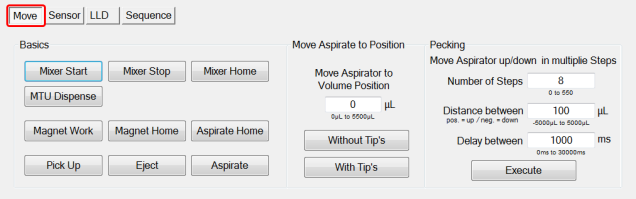
Basics
- Mixer Start (turns the mixer on)
- Mixer Stop (turns the mixer off)
- Mixer Home (moves the mixer to the home position)
- MTUMulti-tube unit—Container used to process tests in the instrument. An MTU contains five separate reaction tubes. The MTU is moved through the instrument by the linear distributor and includes five tiplets for pipettiing to be used in the mag wash station. Dispense (dispenses buffer into the MTU)
- Magnet Work (magnet in the up position)
- Magnet Home (magnet in the home position)
- Aspirate Home (aspirators moved to the home position)
- Pick Up (aspirators pick up tips)
- Eject (aspirators eject tips)
- Aspirate (aspirate fluid from MTU)
Move Aspirate to Volume Position (Select Position)
- Without Tips (aspirates fluid)
- With Tips aspirates fluid)
Pecking (moves the aspirators down in multiple steps with a distance and time delay selected)
Sensor (tab)
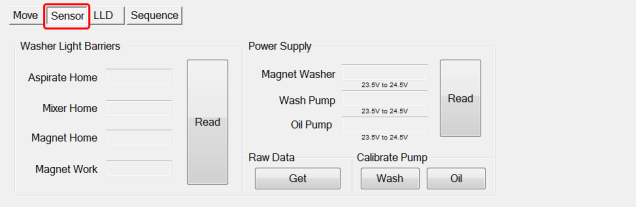
Washer Light Barriers (home sensors)
- Read (sensor blocked or not)
Power Supply
- Read (displays voltage levels)
Pump Light Barriers (home sensors)
- Read (displays in or out of home)
Raw Data (pump calibration data)
Calibrate Pump (calibrates the wash and oil pumps)
LLD (tab)
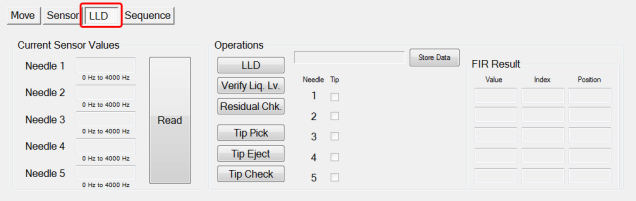
Current Sensor Values
- Read (displays the LLD data for each aspirator)
Operations (displays RIR result data for the following)
- LLD (performs LLD)
- Verify Liq. Lv.(verifies LLD)
- Residual Check Icon (checks for residual fluid)
- Tip Pick (picks the tiplets)
- Tip Eject (ejects the tiplets)
- Tip Check (checks to make sure tips are ejected)
FIR Result
- This section allows the FSE to turn off and on the oil and wash valves individually. It all so allows the FSE to dispense or aspirate a set volume of oil or wash.
Sequence (tab)
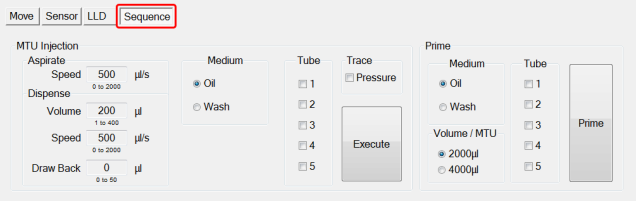
MTU Injection (runs a sequence using oil or wash aspirating and dispensing)
- Aspirate
- Dispense
- Medium
- Valve Delay
- MTU
- Trace
- Execute button
Prime (allows the FSE to prime a MTU or a single tube dispensing 2000ul or 4000ul)
- Medium
- Volume / MTU
- MTU
- PrimeOperation of pumping fluid through tubing to ensure proper and consistent fluid delivery (remove air from the tubing, etc.).
Parameter (tab)
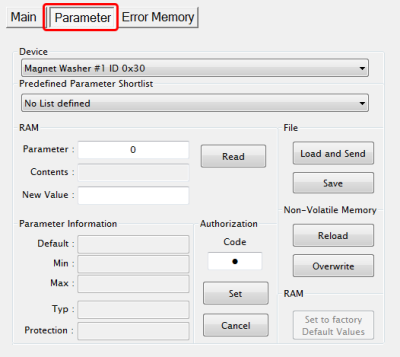
- Display any parameter value of the selected Device by entering a Parameter number and clicking the Read button.
Error Memory (tab)
- Lists errors created by module movement.
 button at the top of the page to send feedback, comments, or change requests.