Reaction Tube Tray Shutter Teaching Procedure
Parts and Materials Required
- Four (4) full Cap & Vial trays (consumables)
Time Required
Procedure
- Start Service Software and from the SC-Front or F-Front&Loading tab, initialize the Cap and Vial Drawers.
- After successful initialization, place Cap and Vial Trays into all four positions of the Left and Right drawers and close the drawers.
- Lift the canopy door so that the shutters are visible.
- On the Parameter Tab, set the Authorization Code to 1.
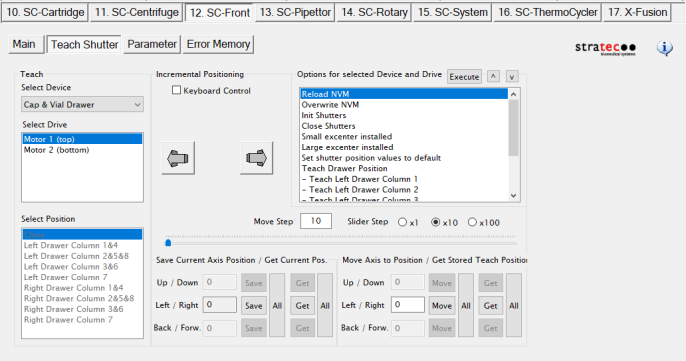
 On the Teach Shutter tab, execute the Init Shutters command from the command list.
- Service Software v4.0.7.0 (w/ System SW v6.2)
- Service Software v5.0.12.0 (w/ System SW v7.1)
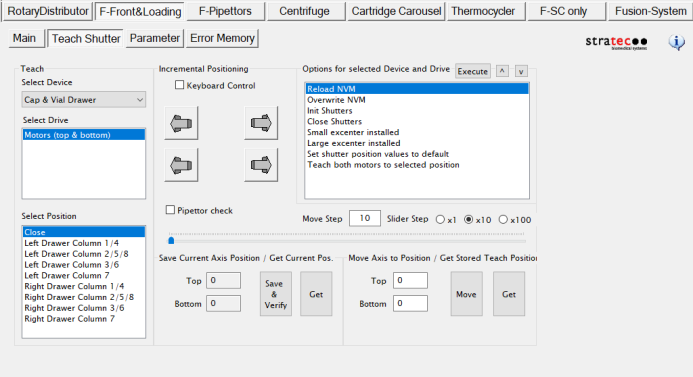
- Select and execute the Drawer and Column combination to be taught.
- Visually inspect the alignment of the shutter openings to the columns of caps and vials on the trays.
The shutters should be centered on the column(s), providing equal clearance on either side of the caps and vials.
- To adjust a shutter, select either Motor 1 (top shutter, motor furthest from the front of the system) or Motor 2 (bottom shutter, closest to the front of the system) from the Select Drive window.
- Use the arrows to move the shutter Left / Right until it is aligned with the target columns.
- Once the position of the shutter(s) is determined, press the Save/Save All button.
 | Note—Only consider the alignment of trays in the selected drawer (Left or Right); the other drawer will be adjusted separately. However, do consider the alignment of both trays within the same drawer. Try to adjust the shutters as best as possible to best accommodate all columns of both trays. |
- Complete alignment and teaching for all columns of both drawers.
- If any shutters were adjusted, execute the Overwrite NVM command to ensure transfer of the positions to firmware.
Verification
- IF any shutters were adjusted, perform a Side Car Pipettor OQ Test:
- Ensure all the full Cap & Vial Trays are still loaded.
- Select the Report, Initialize and Shutter checkboxes.
- Select the Cap & Vial test only (not DiTi).
- Select the Front left drawer option and enter 112 Cycles. (This will start the test on the front left Tray, then move to the Back right Tray so both drawers are tested).
- Click the Side Car Pipettor OQ Test to start the test.
Click the  button at the top of the page to send feedback, comments, or change requests.