Side Car Pipettor OQ Test
The pipettor picks a cap and vial from the cap and vial drawer and places the consumable through the centrifuge.
From there the cap and vial arm takes the consumable to the Thermocycler.
This process is repeated for the specified cap and vials in the drawer.
This procedure can be performed during Fusion Cap and Vial Drawer install, Pipettor installs, Thermocycler Bank or Thermocylcer module installs.
Procedure
- If the DiTi pre-pierce option is enabled, it also pierces all 12 well of a cartridge where a FSE can visually verify that the well are properly pre-pierced.
- From the 15. SC-System tab, select OQ-Test.
- In the Side Car Pipettor OQ Test section, select the Report and Initialize check boxes
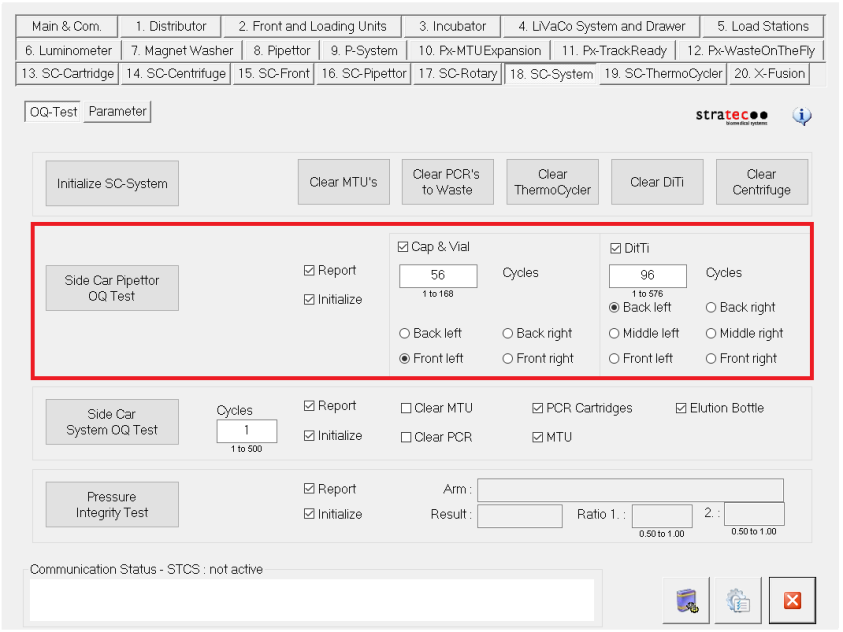
- Select the Cap & Vial or DiTi check box.
 | Note—You can run both tests at the same time if desired. |
- For Cap & Vial enter 56 Cycles; for DiTi enter 96 Cycles.
- Load one full Cap & Vial tray and one full DiTi tray.
Select the rack locations where the trays have been loaded under Cycles. (Front left, Back right, etc.)
- Select Side Car Pipettor OQ Test to begin the OQ.
- Fill in all relevant information in the report submission screen before starting the OQ.
- Save the report when complete.
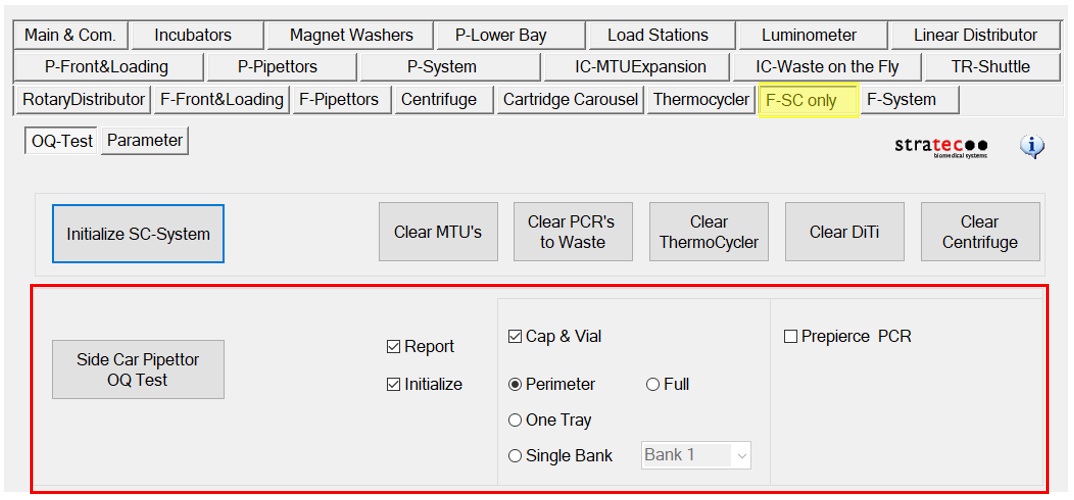
- From the F-SC-System tab, select Side Car Pipettor OQ-Test.
- The following notes outline the updates from the previous version of Service Software
- DiTi OQ removed
- Now pre-pierce of cartridge is included in Sidecar Pipettor OQ (can be enabled/disabled).
- If enabled, the cartridge MUST be placed in tray position 1.
This will move the cartridge from the loading carousel (prompted to load by user)
to the reaction setup station and command the vial robot arm to pierce all 12 wells of loaded cartridge.
This will happen only once, despite any other configuration options in the OQ. - If not enabled, only Cap and Vial consumable movement will be conducted.
- This happens once regardless of cycle count of OQ.
- Shutter option no longer available. Shutter movement will now always be utilized in OQ.
- Cap and Vial options now are as follows:
- Full:
Uses all 56 consumables from each of the four trays for a total of 224 consumables. - Perimeter:
Uses the perimeter 26 consumables from each of the four trays for a total of 104 consumables.
This takes much less time than the 224 consumables used in the full OQ.
This is useful for qualifying cap and vial drawer R&R/Teaching or instrument install and reducing time in half. - One Tray:
Uses all 56 consumables from one tray.
This is useful for qualifying Thermocycler R&R. - Single Bank:
Uses the first 5 consumables from one tray.
This is useful for qualifying a single Thermocycler bank R&R.
|
|
Note—
Replace USED trays.
SSW consumable usage is not tracked by the Panther Database. |
 For Service Software v4.0.7.0 with System SW v6.2.5.1
 button at the top of the page to send feedback, comments, or change requests.