MTU Expansion Autoteach
- Power on the Panther system and PC.
- Start Service Software.
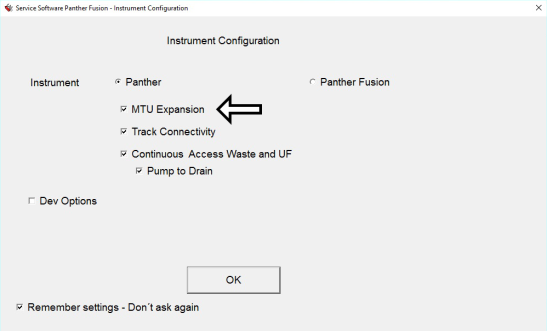
 Verify that MTUMulti-tube unit—Container used to process tests in the instrument. An MTU contains five separate reaction tubes. The MTU is moved through the instrument by the linear distributor and includes five tiplets for pipettiing to be used in the mag wash station. Expansion is a configured module on the Instrument Configuration page.

- Remove all MTU carriers from the system.
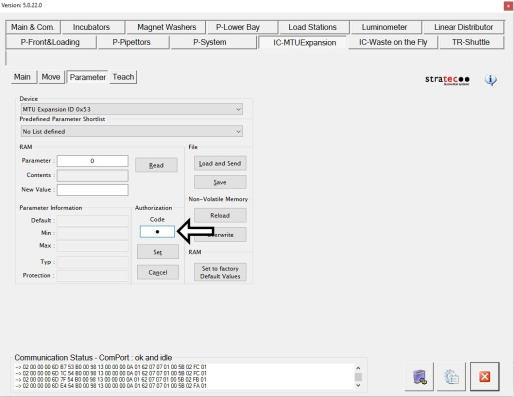
- Set Authorization Code.
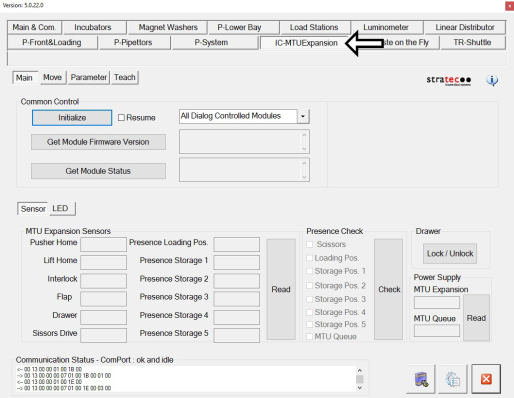
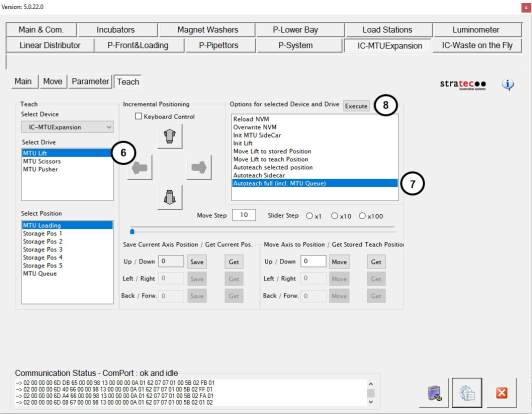
- Select the Teach tab and verify MTU Lift is selected.
- Select Auto teach full (incl. MTU Queue).
- Click Execute. The Auto Teach will now begin.
Note—A dialog box will appear asking if the carriers were removed from the MTU Expansion module. Verify to make sure there are no carriers in the module. - After Auto Teach is complete, install ALL MTU Carriers in the MTU Expansion Module.
- Place MTU Carriers into any positions within the MTU Expansion module.
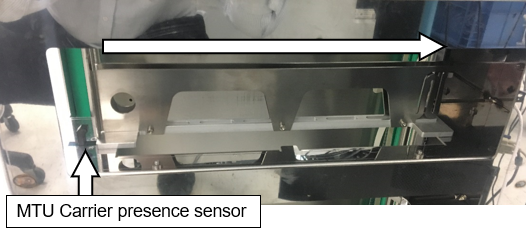
- Orient all MTU Carriers as shown below:
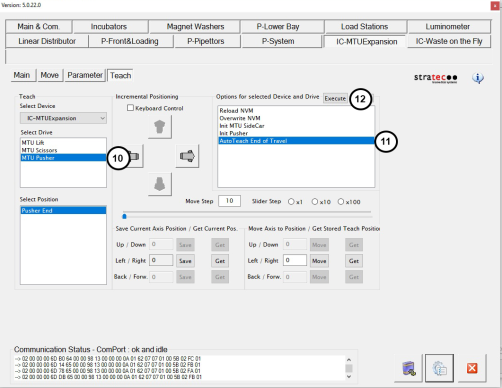
- Under Select Drive, select MTU Pusher.
- Select AutoTeach End of Travel.
- Click Execute. The Auto Teach will now begin.
Note—A dialog box will appear asking if the MTUs were removed from the carrier. Verify to make sure the carrier is empty. - Continue to Install the MTU Sidecar Covers.
 button at the top of the page to send feedback, comments, or change requests.