Eaton UPS Alarm Settings for MS Windows 10
Parts and Materials Required
- None
Time Required
- 10 Minutes
Procedure

|
Note—
ALL Fusion Installs require the Output Voltage on the UPS to be set at 220V. |
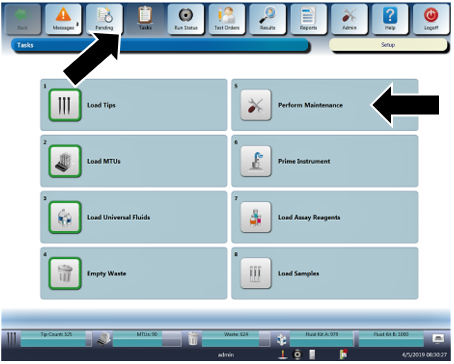
- Navigate to Tasks in the Panther GUI.
 Click on Perform Maintenance.
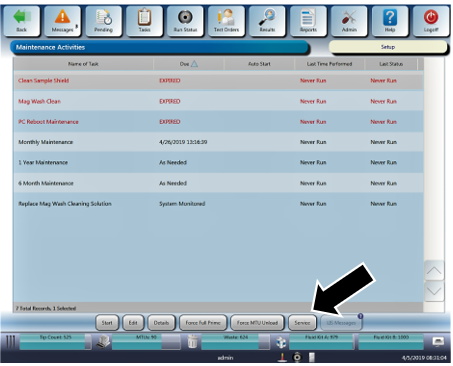
- Select Service.
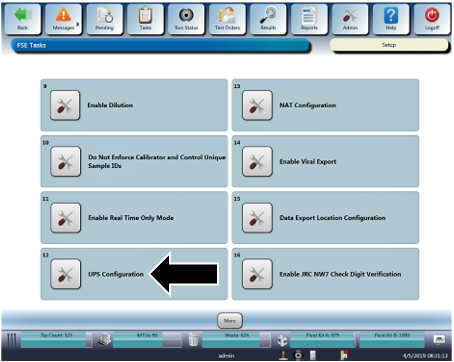
- Select UPS Configuration.
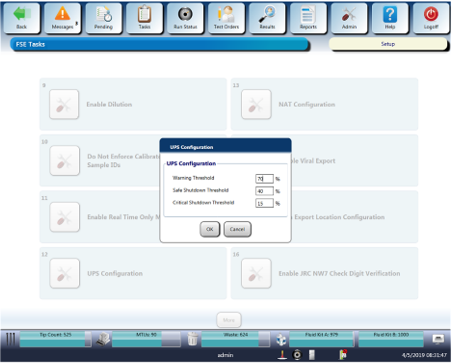
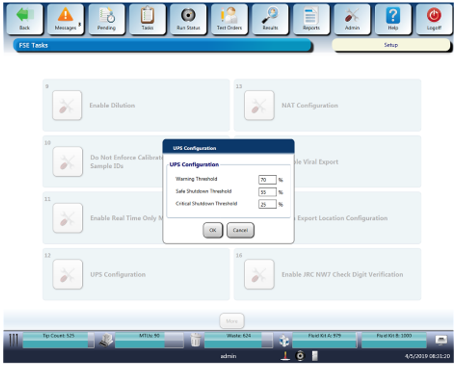
- The UPS Configuration window opens, displaying the current alarm thresholds.
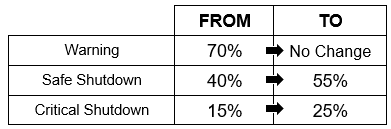
- Edit the UPS alarm threshold according to the following table:
- Leave the Warning Threshold at 70%.
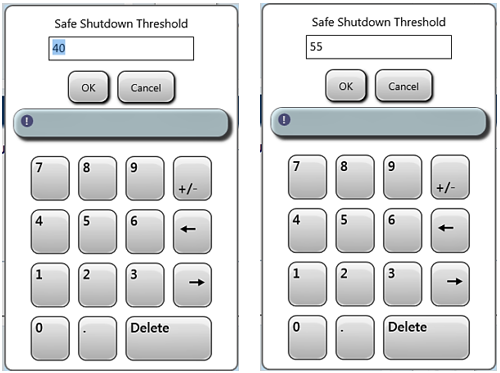
- Tap or click on 40% (Safe Shutdown) and use the on screen keypad to change that value to 55%. Click OK.
- Use the same technique to change the 15% Critical Shutdown) value to 25%.
- Take a screenshot of the configuration screen showing the new alarm configuration, saving it with a filename that includes the system serial number and date (example: 01234_UPS_Alarms_12Jul2019).
- Click OK and exit the UPS Configuration screen.
Verification
None
 button at the top of the page to send feedback, comments, or change requests.