Auto Detect Pump Calibration
Purpose
The following provides instructions on how to calibrate the Luminometer's Auto Detect Pump.
Procedure
- Open and log into Service Software.
- Click on the Luminometer Tab.
- From the Common Control dropdown menu, initialize the following modules:
- Linear Distributor
- Input Queue
- Luminometer
- Ensure there is at least one MTU
 Multi-tube unit—Container used to process tests in the instrument. An MTU contains five separate reaction tubes. The MTU is moved through the instrument by the linear distributor and includes five tiplets for pipettiing to be used in the mag wash station. in the Input Queue.
 - From the Luminometer Main tab, select the Door Open button.
- From the Distributor Move tab, select the Push MTU button to pack the Input Queue.
- From the Distributor Move tab, pick an MTU from the Input Queue and place it in the Luminometer.
- From the Luminometer Main tab, select the Door Close button.
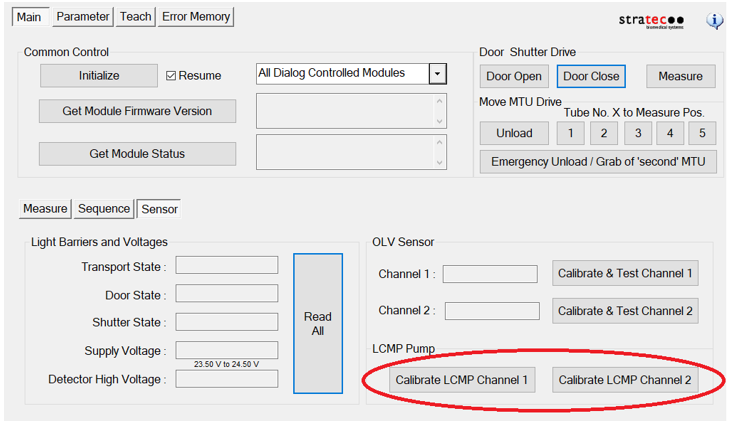
- From the Luminometer Sensor tab:
- Select the Calibrate LCMP Channel 1 button.
- Select the Calibrate LCMP Channel 2 button.
- Using the Distributor, move the MTU from the Luminometer to the Output Queue, and dispose of the MTU.
 button at the top of the page to send feedback, comments, or change requests.