Cleaning the Output Queue Cover’s Stanchion
Purpose
The purpose of this procedure is to provide instructions on how to clean the stanchion that holds the Output Queue (OQ) cover.
What is Affected
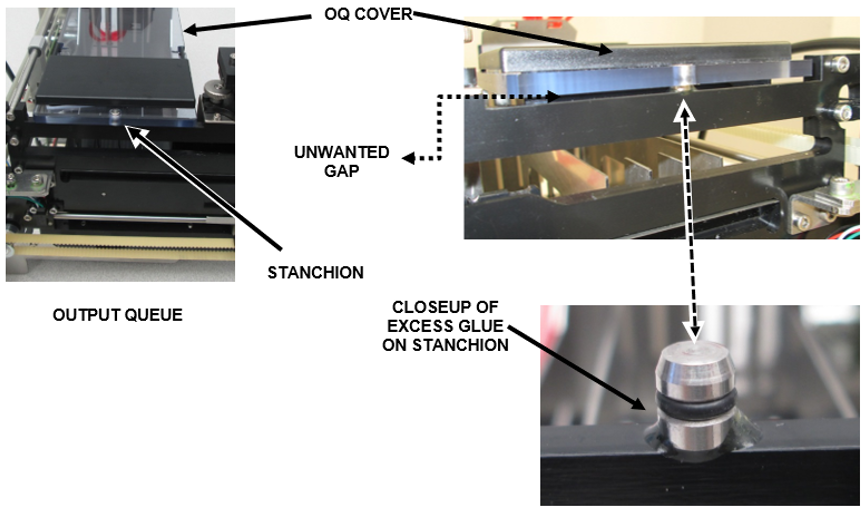
 During manufacturing, some OQs have an excess of glue applied to the stanchion that holds the OQ cover. This excess glue can create a gap between the OQ Cover and the frame of the OQ (as much as 2 mm). This gap can affect MTUMulti-tube unit—Container used to process tests in the instrument. An MTU contains five separate reaction tubes. The MTU is moved through the instrument by the linear distributor and includes five tiplets for pipettiing to be used in the mag wash station. loading, and can cause module failures such as actuator step losses.
Parts and Materials Required
- Proper PPE
- Panther Tool Kit
Procedure
- Put on proper PPE.
- Shutdown the Panther System and PC.
- Turn off the main power.
- Open the Right-side Door.
- Remove the Output Queue cover.
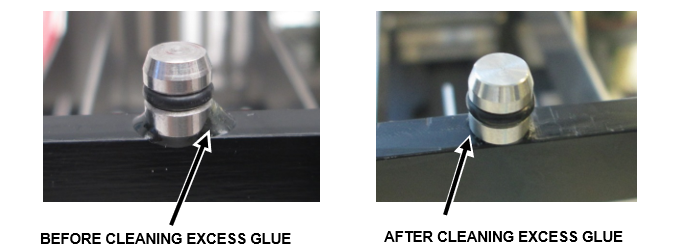
- Use a utility or X-Acto knife to scrape off any excess glue around the OQ lid stanchion.
- Replace the OQ cover.
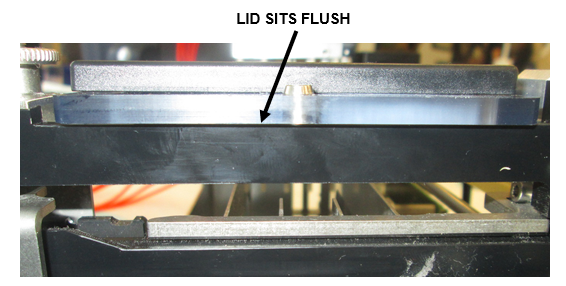
- Verify that the cover sits flush on the frame.
- Turn the main power on.
- Power on the Panther System and PC.
Verification
- Start the Panther Main.
- Run a full system prime.
- Observe and confirm smooth transfer of all MTUs to the OQ stack.
 button at the top of the page to send feedback, comments, or change requests.