Aspirator Drive Motor Current Increase and Speed Decrease Procedure
Tests have indicated that many fatal Output Queue errors are caused by stalls of the aspirator drive motor. Error messages that indicate the Output Queue has failed due to an ‘actuator drive’ error are in fact due to the aspirator drive stalling. To address this, this procedure:
- Increases the motor current of the aspirator drive.
- Slows the speed the aspirators move, allowing the aspirators time to remove the fluid as they travel downward. This will help prevent the outside of the aspirators from becoming wet, which can leave residue which may eventually lead to a motor stall.
Parts and Materials Required
- N/A
Time Required
- 15 minutes
Procedure
- Power up the Panther System and PC.
- Start Service Software. (Log in as "gpservice")
- Check the current value of the parameter.
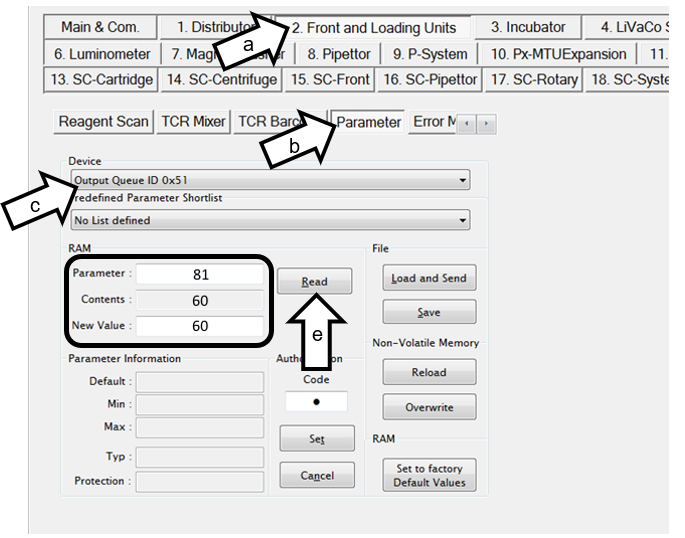
 Click on 2. Front and Loading Units tab and on the Main page.
- Click on Parameter
- Select Output Queue ID 0x51 in the Device drop-down box.
- Enter 81 in the Parameter number box.
- Click Read.
- The default content of this parameter is 60, this procedure will update the value to 100.
- Enter 4 in the Parameter number box. Parameter 4 determines the speed the aspirators move up-and-down.
- Click Read.
- The default content of this Parameter is 800, this will update the value to 300.
- If the value for Parameter 81 is NOT 100 and/or if Parameter 4 is NOT 800, Proceed to Step 4.
- To update the parameter contents:

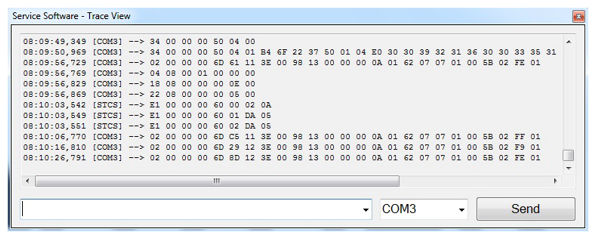
Note—The window may be hidden behind the main Service Software window. If not open, click on the Show Trace View button on the Main & Com. Tab. Notice the command input window on the bottom. - In the input window:
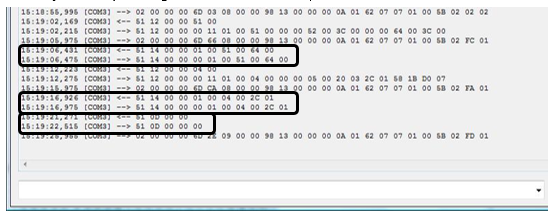
- Type 51 14 00 00 01 00 51 00 64 00 and press Send. This sets parameter 81 to 100.
- Verify a receipt string of 51 14 00 00 00 01 00 51 00 64 00.
- Type 51 14 00 00 01 00 04 00 2C 01 and press Send. This sets parameter 4 to 300.
- Verify a receipt string of 51 14 00 00 00 01 00 04 00 2C 01.
- Type 51 0D 00 00. This saves the parameter changes to NVM.
- Verify a receipt string of 51 0D 00 00 00.
- Exit Service Software.
- Power down the Panther System.
- Check the cleanliness of the aspirators and verify smooth movement up-and-down.
- In the input window:
Verification
- Power on the Panther System.
- Start Service Software and login as “gpservice”.
- Repeat Step 3 in the procedure above. Verify that the value of Parameter 81 is 100 and the value of Parameter 4 is 300.
- Exit Service Software and exit the FSE Shield.
- Document in Oracle that this procedure was performed.
 button at the top of the page to send feedback, comments, or change requests.