Using the FlashCheck Analysis Spreadsheet
Parts and Materials Required
- FlashCheck Analysis Spreadsheet Version 5.01 or higher (located on the HUB)
- Sendlogs package that includes curve data from the FlashCheck assay
Time Required
- 5 minutes, not including the FlashCheck verification test procedure.
Procedure
Use the following procedure if Remote Dashboard on the Panther cannot interpret Flashcheck.
- After completing a Flashcheck Assay
 Procedures required to prepare and perform a specific test. In the context of this document, assay refers exclusively to a Hologic test, such as Aptima Combo or Ultrio., collect a Sendlogs package.
Note—The Sendlogs package MUST include curve data from the Flashcheck run to be analyzed. - Load the Sendlogs package onto the FSE laptop, unzip and open the “Curves” folder.
- Open the folder with the correct Flashcheck run you would like to interpret / analyze day.
- Right Click on the FlashCurve_YYYY_MM_DD_HH_MM_SS.curve file and open with Excel.
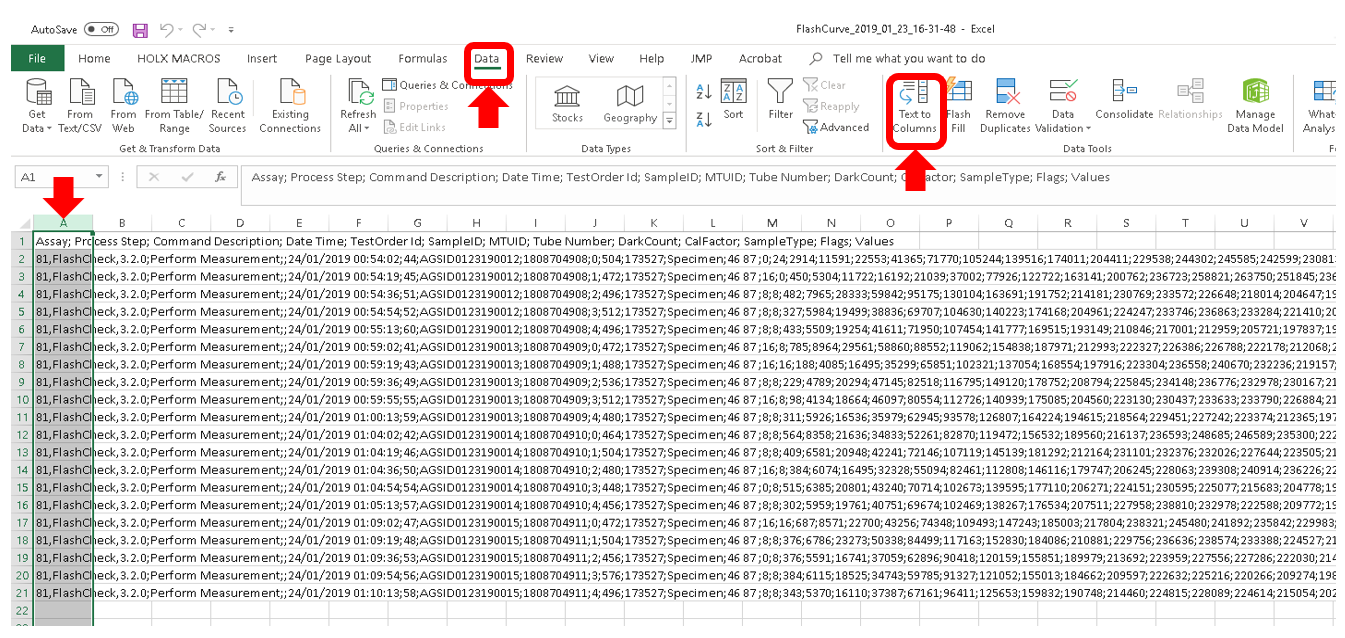
- Select the first column (Column A).
- Click the Data tab on the menu bar.
- Then click on the Text to Columns icon.
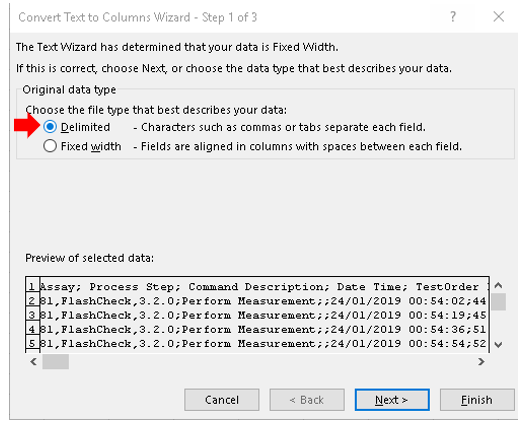
- Select Delimited and click Next.
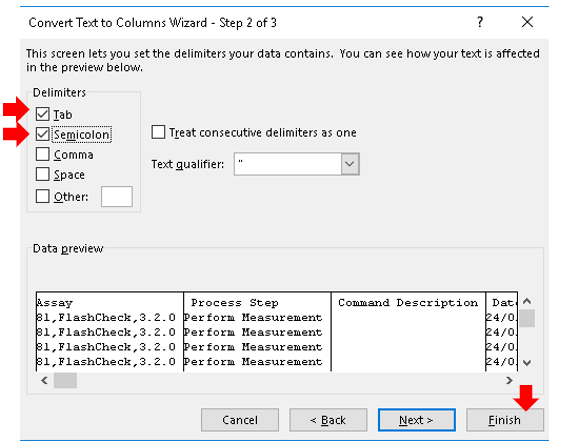
- Select the option to delimit by Tab and Semicolon and click Finish.
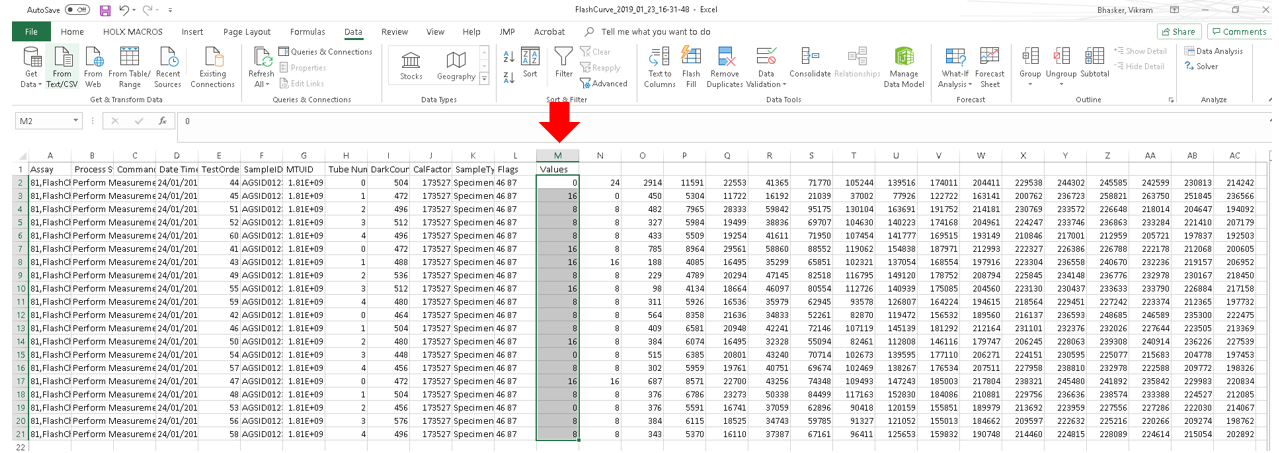
- Select the first 20 cells in the Values column.
- Press the Ctrl+Shift+Right arrow keys to select all the data to the right of the column and copy this selection.
- Once this data is on the clipboard, navigate to the open FlashCheck Analysis spreadsheet v5.01
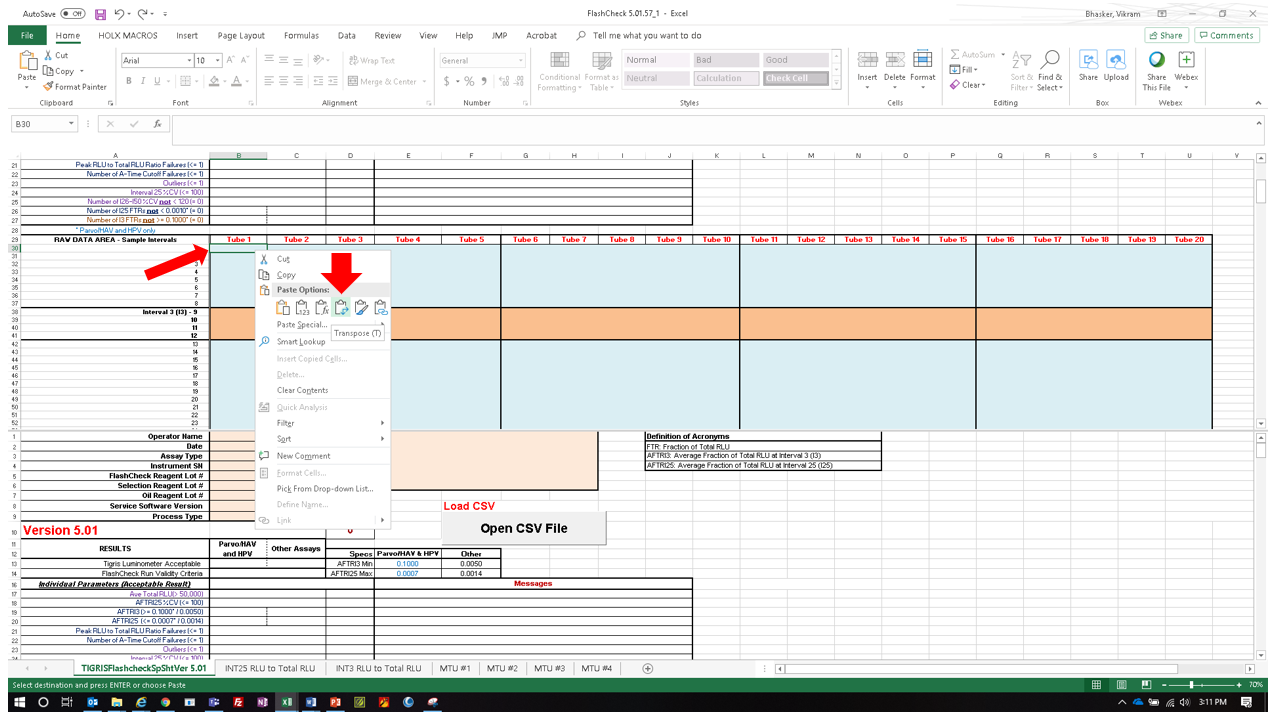
- Right-click on cell B30 and use the Transpose option to paste this data.
- The macro should now interpret your data.
RESULTS INTERPRETATION

|
IMPORTANT! Ensure that test results obtained are within acceptance criteria. Failure to achieve the expected results is an indication of a Detect Reagent system injection failure. Other possible sources of error include operator error, fluid or reagent failure, or faulty equipment performance. |
A. Acceptance Criteria:
- The average total RLURelative light unit for any run with FlashCheck must be greater than or equal to 50,000 RLU. Values less than 50,000 RLU may be an indicator of faulty equipment performance or reagent deterioration.
- For the pumps and injectors to be acceptable, the average fraction of total RLU at interval (AFTRI) 3 and 25 must be less than or equal to the values listed in item 1 of the Purpose section for the respective assays that will be run on the system.
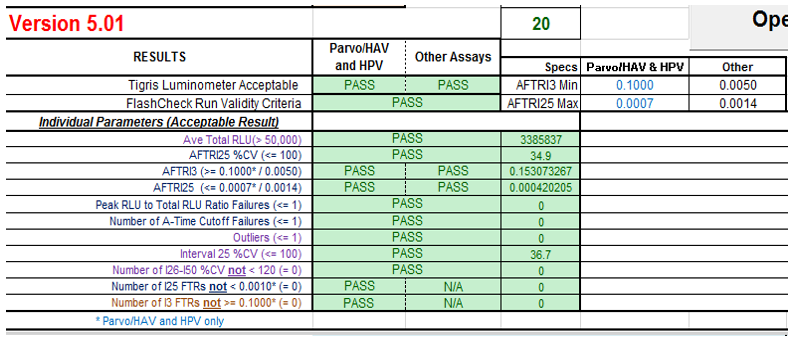
- The FlashCheck procedure is considered PASS if each individual Result Interpretation on the Spreadsheet passes. A spreadsheet that states “PASS” for both the “TIGRIS Luminometer Acceptable” and “FlashCheck Run Validity Criteria” parameters denotes a passing FlashCheck run for the data analyzed. The following image shows the results of a FlashCheck run that passes acceptance criteria for all assays.
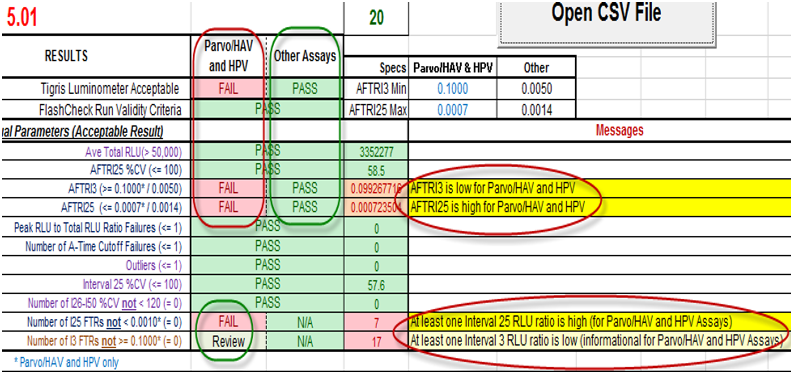
- For each FlashCheck .csv data file analyzed, the updated spreadsheet checks the results against the more stringent HPV/HPV-GT acceptance criteria and the less stringent criteria for systems that do not run these assays.
Note— The system that generated these FlashCheck results should not be used for HPV/HPV-GT Assays, but can be used for other assays (e.g., AC2
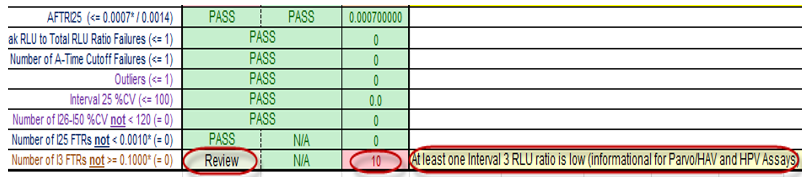
Aptima Combo 2 Assay for Chlamydia trachomatis and Neisseria gonorrhoeae and ATV). - The following image highlights the results that are displayed if any replicate contains an interval 3 RLU/total RLU value that is below 0.1000.
The number of replicates with I3 RLU/total RLU less than 0.100 is shown along with a status of “Review” and a message stating that at least one I3 RLU ratio is low. This check is for information only and applies to systems running HPV/HPV-GT Assays.
Although this is an information-only check and is not a formal requirement, systems that run HPV/HPV-GT Assays SHOULD NOT generate any FlashCheck I3 RLU/total RLU values below 0.1000.
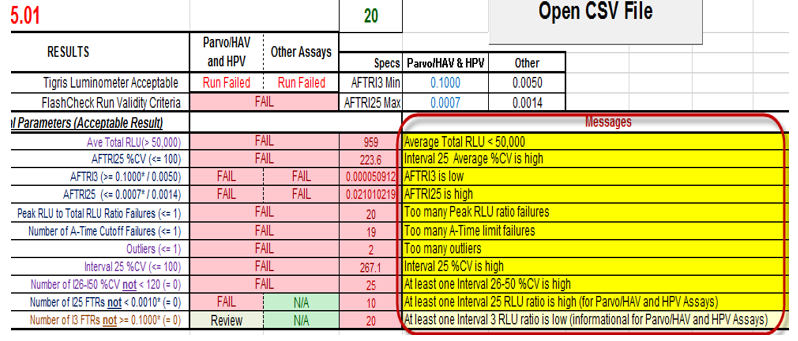
- The following image shows the messages that are generated due to various failures to meet FlashCheck specifications. These messages can be used to identify and address failed specifications.
B. Retest Criteria:
- If initial test results do not meet acceptance criteria, repeat performance of the FlashCheck verification test. Results for the retest performed must meet the acceptance criteria.
Note—Failure to meet acceptance criteria for the repeat test may indicate faulty equipment or reagent/fluid performance. - If necessary, replace the suspected faulty equipment, reagent/fluid, and repeat the FlashCheck verification test, and evaluate the new results.
C. Documentation
- Attach all completed FlashCheck Analysis Spreadsheets used for analyzing FlashCheck verification tests on customer systems to the Customer Relationship Management System (CRM), as needed.
 button at the top of the page to send feedback, comments, or change requests.