Dashboard - Feature Management
The Feature Management screen allows users to configure Dashboard features and add site information to reports.
To access the Feature Management screen, select Features from the Administration screen.
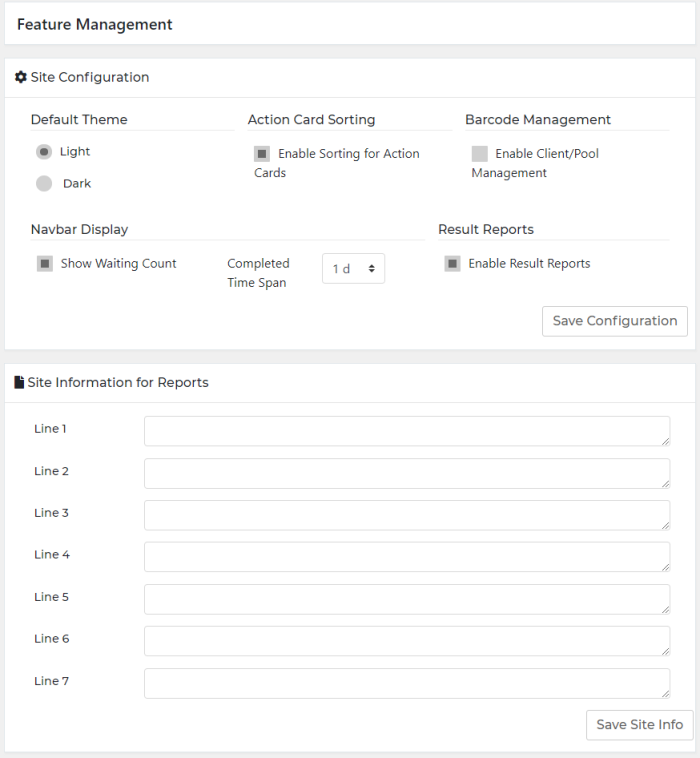
| Left Panel Options | Description |
|---|---|
| Default Theme |
Select background and text colors. |
| Action Card Sorting |
Select the Enable Sorting for Action Cards link to rearrange the Action Cards in the Consumables and Maintenance Bar to the most urgent action card on the left side of the screen. Applicable to Card View only. Disable this setting to maintain a static arrangement of action cards. |
| Barcode Management |
Select this option to gain access to the Client and Pooling options throughout the dashboard. |
| Navbar Display |
Select the Show Waiting Count link to view the Waiting Field on the Navigation Bar. Select Completed Time Span from the drop-down menu. |
| Result Reports |
Select the Enable Results Reports to allow access to the Result Reports screen. |
| Save Configuration |
Saves any changes made to the configuration setting. |
| Site Information for Reports |
Edit these fields to provide the information displayed in the header on the first page of all Dashboard-generated reports. |
| Save Site Info |
Saves any changes made to site information. |
 button at the top of the page to send feedback, comments, or change requests.