Incubator Parameter Verification Procedure
Purpose
This is an advisory notice to inform FSEs about an inconsistency in the parameter settings on some Incubators.
What is Affected
We have found an inconsistency in the parameter settings of some Incubator modules. These parameters affect the incubator carousel movement to position an MTU Multi-tube unit—Container used to process tests in the instrument. An MTU contains five separate reaction tubes. The MTU is moved through the instrument by the linear distributor and includes five tiplets for pipettiing to be used in the mag wash station.. An incorrect parameter can cause an error (such as “carousel motor suffered step loss or stalled”) on ‘Start-up’, ‘Exiting Power Save’, or ‘AssayProcedures required to prepare and perform a specific test. In the context of this document, assay refers exclusively to a Hologic test, such as Aptima Combo or Ultrio. Processing’.
Three parameters need to be verified on each Incubator.
The Table below lists the correct values for each parameter.
Correct Parameter Settings
| Parameter | High Temp (INC1) | Transition (INC2) | Amp (INC3) |
|---|---|---|---|
| 107 - Ramp Current | 100 | 100 | 70 |
| 108 - Move Current | 70 | 70 | 50 |
| 118 - Maximum Retires | 3 | 3 | 3 |
Time Required
- 30 Minutes
Procedure
- Put on proper PPE.
- Power on the Panther System.
- Start the Service Software.
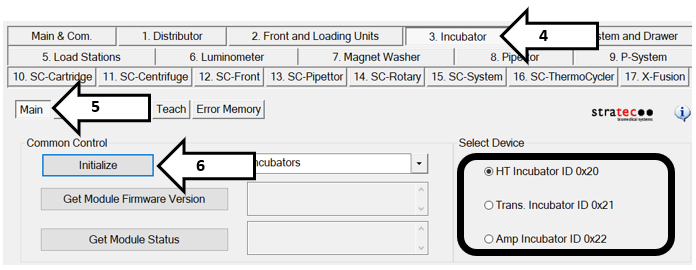
- Click on the Incubator tab.
- Select the Main page.
- Initialize all 3 incubators.
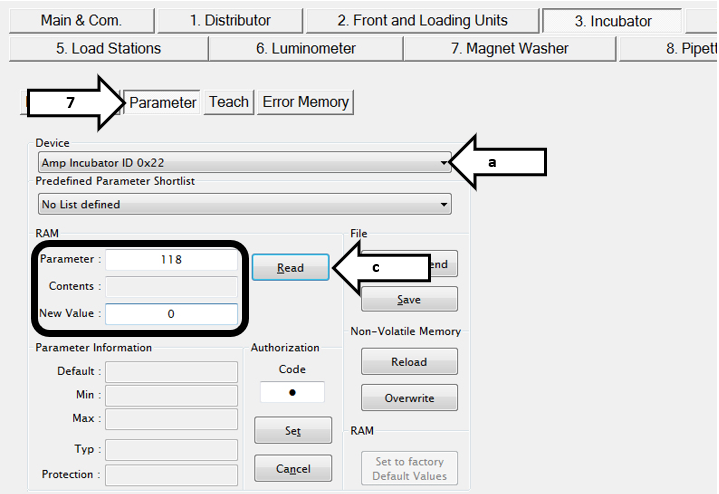
- Click on Parameter.
- Check each parameter value listed in the Table above:

Note—If any value is incorrect and needs to be changed, proceed to Step 9.
Note—If all values are correct, no changes need to be made. Exit the Service Software and exit the FSE Shield. Document in Oracle that this procedure has been performed. - To change an incorrect Parameter:
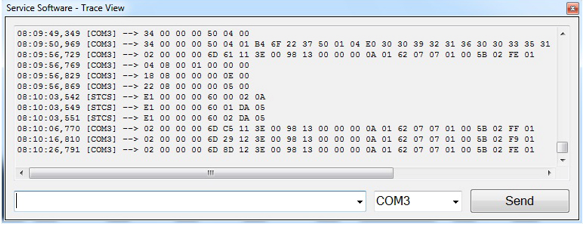
- Display the Trace View Window.
Note—The Trace View Window may be hidden behind the main Service Software window. If not open, click on the Show Trace View button on the Main & Com. tab.) - Ensure the COM3 is selected in the communication port drop-down menu.
- Use the commands listed below for each incubator to correct any parameters that were found to be incorrect in Step 8.
- Enter the string (low-level command) to unlock NVM and click Send.
- Enter the string to change the desired parameter (107, 108, and 118) to the correct value and press Send.
- For each command sent, verify the expect return string is displayed.
- Enter the string to Save NVM and press Send.
- Display the Trace View Window.
HT (INC1)
| Description | Low-Level Command to be sent in SSW | Expected Return String |
|---|---|---|
| Unlock NVM | 20 16 00 00 01 00 | 20 16 00 00 00 01 00 |
| Set par 107 to 100 | 20 14 00 00 01 00 6B 00 64 00 | 20 14 00 00 00 01 00 6B 00 64 00 |
| Set par 108 to 70 | 20 14 00 00 01 00 6C 00 46 00 | 20 14 00 00 00 01 00 6C 00 46 00 |
| Set par 118 to 3 | 20 14 00 00 01 00 76 00 03 00 | 20 14 00 00 00 01 00 76 00 03 00 |
| Save NVM | 20 0D 00 00 | 20 0D 00 00 00 |
Trans (INC2)
| Description | Low-Level Command to be sent in SSW | Expected Return String |
|---|---|---|
| Unlock NVM | 21 16 00 00 01 00 | 21 16 00 00 00 01 00 |
| Set par 107 to 100 | 21 14 00 00 01 00 6B 00 64 00 | 21 14 00 00 00 01 00 6B 00 64 00 |
| Set par 108 to 70 | 21 14 00 00 01 00 6C 00 46 00 | 21 14 00 00 00 01 00 6C 00 46 00 |
| Set par 118 to 3 | 21 14 00 00 01 00 76 00 03 00 | 21 14 00 00 00 01 00 76 00 03 00 |
| Save NVM | 21 0D 00 00 | 21 0D 00 00 00 |
AMP (INC3)
| Description | Low-Level Command to be sent in SSW | Expected Return String |
|---|---|---|
|
Unlock NVM |
22 16 00 00 01 00 | 22 16 00 00 00 01 00 |
| Set par 107 to 70 | 22 14 00 00 01 00 6B 00 46 00 | 22 14 00 00 00 01 00 6B 00 46 00 |
| Set par 108 to 50 | 22 14 00 00 01 00 6C 00 32 00 | 22 14 00 00 00 01 00 6C 00 32 00 |
| Set par 118 to 3 | 22 14 00 00 01 00 76 00 03 00 | 22 14 00 00 00 01 00 76 00 03 00 |
| Save NVM | 22 0D 00 00 | 22 0D 00 00 00 |
Verification
- Exit the Service Software.
- Power down the Panther System.
- Open the Service Software.
- Click on the Incubator tab.
- Click on the Main page.
- Initialize all 3 incubators. all 3 incubators.
- Click on Parameter.
- Check each parameter value listed in the Table in the What is Affected section:
- Exit the Service Software and FSE Shield.
- Document in Oracle that this procedure has been performed.
 button at the top of the page to send feedback, comments, or change requests.