Enable Thermocycler Banks and Centrifuge
Purpose
Use this procedure if there are out-of service Thermocycler banks or the Centrifuge needs to be enabled.
This may be necessary if System Software recognizes that tubes were not removed properly from the Centrifuge or Thermocycler and enters Panther Only mode. Another indication may be a Panther Main (Panther GUI) error message that the Thermocycler or Centrifuge is out of service.
Time Required
- 5 Minutes
Procedure
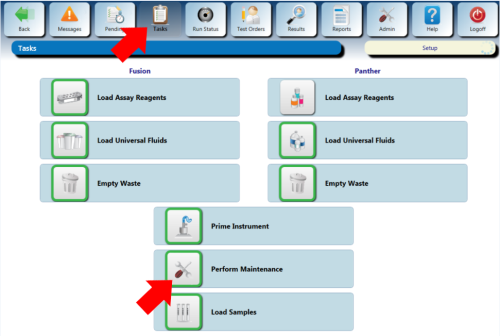
 From the Panther Main screen, select Tasks > Perform Maintenance.
- Click the Service button on the bottom taskbar (next to Force MTUMulti-tube unit—Container used to process tests in the instrument. An MTU contains five separate reaction tubes. The MTU is moved through the instrument by the linear distributor and includes five tiplets for pipettiing to be used in the mag wash station. Unload).
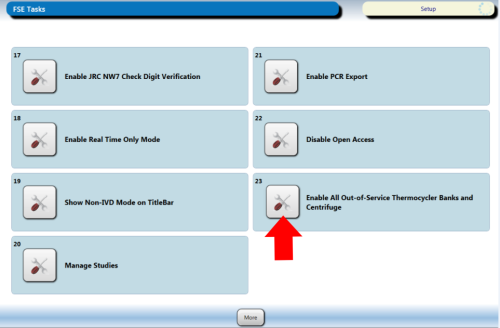
- Select the More button twice. Select Enable All Out-of-Service Thermocycler Banks and Centrifuge.
- A system restart will be needed after the button is selected.
Verification
- Power on the Panther System and PC.
- Start Panther Main and verify system initializes with no errors.
 button at the top of the page to send feedback, comments, or change requests.