Panther System Pipettor Teaching
- Move the Elution Buffer Transfer Arm over to the Panther System side.
- Click Teacher on the Panther Fusion Shield. Leave the password blank.
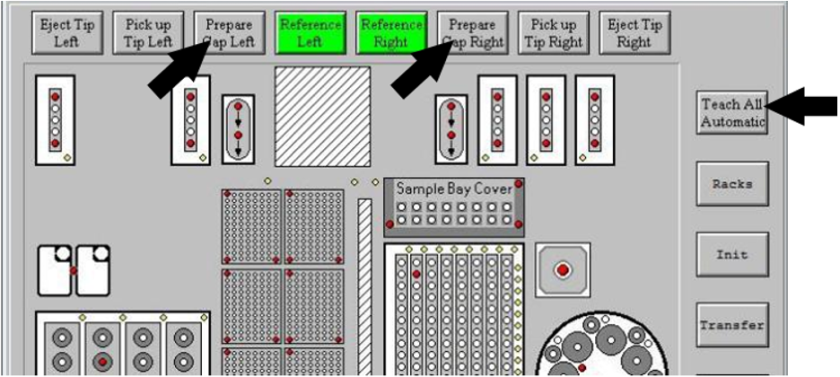
- Click the Prepare Cap Left button and install a Teach Cap on the Reagent Pipettor. Click OK at the onscreen prompts.
- Click the Prepare Cap Right button and install a Teach Cap on the Sample Pipettor. Click OK at the onscreen prompts.
- Click the Teach All Automatic button.
- In the Instruction window (Move the elution carrier...) click OK.
- In the Question window (Shall the position be taught automatically?) click Yes.
- When teaching is complete, all symbols will turn green. (Note that some versions of Teacher software will have two unused symbols to the right of the Sample Load Station symbol; these two symbols will not turn green.)
 | Note—If the Automatic teaching fails, you may have to manually teach an individual module first and then run Teach All Automatic again. |
- Click Quit.
- In the Question window (Do you want to transfer coordinates before?) click OK.
- When finished, click OK in the Instruction window (Coordinates successfully transferred). The Teacher window will close.
- Eject (or remove) the Teach Caps.
Click the  button at the top of the page to send feedback, comments, or change requests.