Fusion Handoff Station Removal and Replacement

|
Note—A Firmware Installation procedure must be performed when replacing a module or PCB. |
Parts and Materials Required
- FSE Tool Kit
- Bench Top Pads
- Handoff Station
Time Required
- 60 Minutes
Removal Procedure
- Put on proper PPE.
- Remove the Rotary Distributor from the Fusion and place on bench pads on a flat work surface or bench.
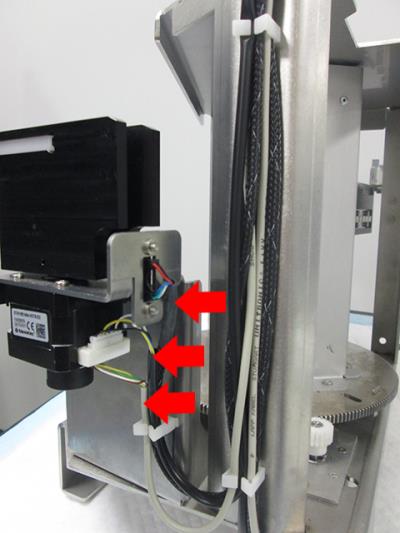
Refer to the Rotary Distributor Removal and Replacement procedure.  Locate the three cables that are attached to the Handoff Station (Home Sensor, Theta Motor, Theta Encoder).
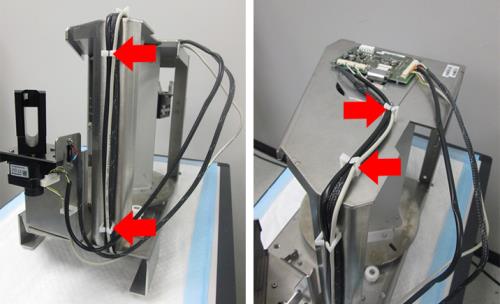
- Free all three cables from the cable clamps on the front and top of the Distributor (2 on the front, 2 on top).
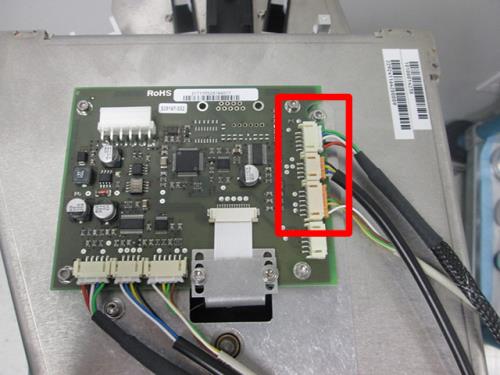
- Disconnect the three cables from the PCB.
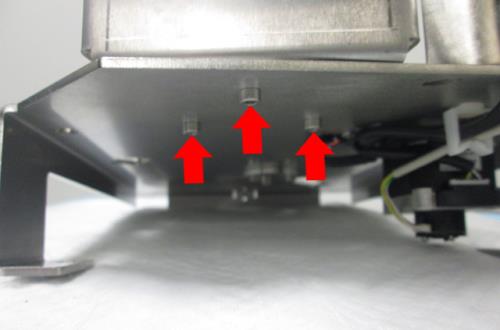
- Underneath the Handoff Station, remove and save the three hex screws (2.5mm) that secure the base of the Handoff Station to the Distributor frame.
- Remove the Handoff Station from the Distributor frame.
Replacement Procedure
- Set the new Handoff Station in place on the frame. From underneath the Handoff Station, re-use the three hex screws (2.5mm) to secure the base of the new Handoff Station to the Distributor frame.
- Connect the three new cables to the PCB as shown.
- After connecting the three cables to the PCB, route the cables back into the cable clamps on the top and front of the Distributor (2 on the top, 2 on front).
- Verify the Home Sensor, Theta Motor and Theta Encoder connections on the new Handoff Station are secure.
- Replace the Rotary Distributor back into the Fusion.
Refer to the Rotary Distributor Removal and Replacement procedure.
Verification
- Ensure all steps in the Verification section of the Rotary Distributor Removal and Replacement procedure are completed, with the exception of the Firmware update. It is not necessary to update firmware when replacing the Handoff Station.
 button at the top of the page to send feedback, comments, or change requests.