What is Affected
During manufacturing, a CAN Bus Terminator was added to the Master COP. The terminator improves signal quality by reducing communication timeouts.
- Panther Systems 02242 and above have the terminator installed during manufacturing. (Move the terminator to Slot 12 (J12) when installing a Fusion Module.)
- On Panther Systems 02241 and below, install the terminator.
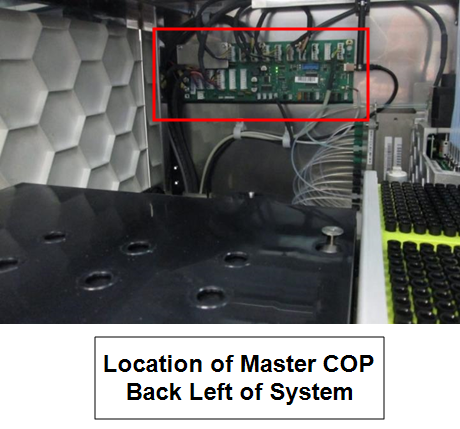
Parts and Materials Required
- Proper PPE
- Panther Tool Kit
- CAN-Bus-Terminator
Time Required
- 15 minutes
Procedure
For Panther System Serial # 02241 and below
- Put on proper PPE.
- Shutdown the system and PC.
- Locate the COP module inside the Panther System. The COP is located on the top left corner of the back wall inside the Panther System.
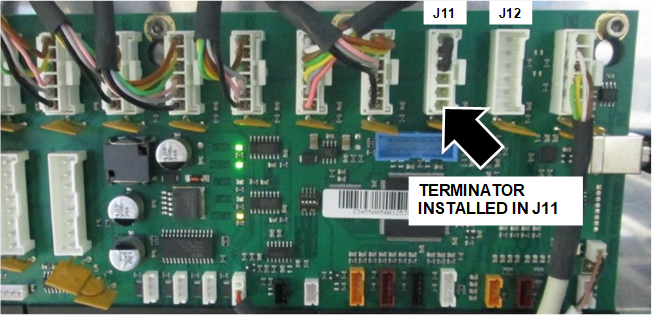
- Install the terminator in Slot 11 (J11).
For Panther System Serial # 02242 and Above
Terminator already installed
- Verify the terminator is installed in Slot 11 (J11).
Verification
- Turn on the system and PC.
- Initialize the system.
 button at the top of the page to send feedback, comments, or change requests.