MTU Expansion Installation Verification
- Open Service Software.
- Ensure all MTU
 Multi-tube unit—Container used to process tests in the instrument. An MTU contains five separate reaction tubes. The MTU is moved through the instrument by the linear distributor and includes five tiplets for pipettiing to be used in the mag wash station. Carriers are loaded into the sidecar. For this OQ, all six carriers must be loaded.
You can move a carrier to the MTU Queue or loading position via service software.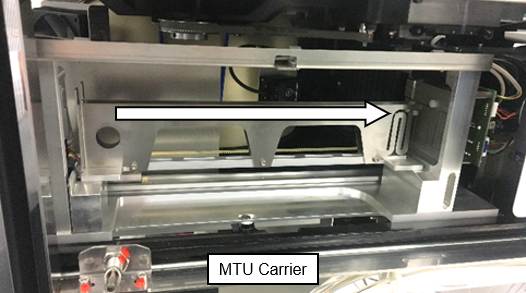
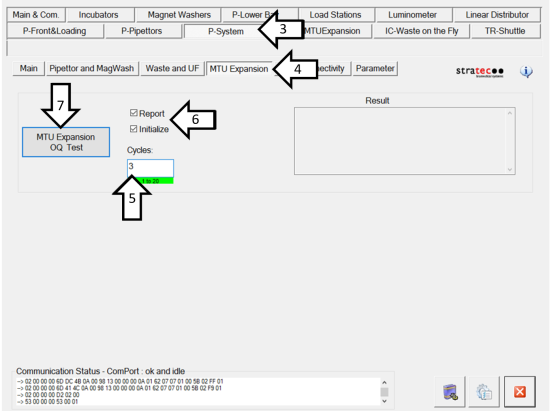
- Click on the P-System tab.
- Click on the MTU Expansion tab.
- Change the number of Cycles to 3.
- Ensure that Report AND Initializeare checked.
- Click on MTU Expansion OQ Test to start the test.
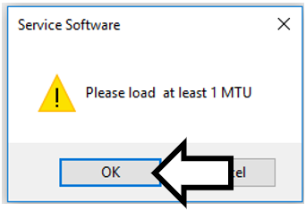
- A pop up will appear asking to load at least 1 MTU. Insert one MTU and click OK.
- The OQ Test will begin.
- After each OQ cycle is completed, you will be required to insert at least 1 MTU and click OK.

Caution—Failure to pick or place a carrier results in a failed Operational Qualification. - If all 3 OQ cycles are completed without an error, save the report to a flash drive for attachment to the Installation Record.
- MTU Expansion Installation is complete.
 button at the top of the page to send feedback, comments, or change requests.