Selecting the System Software Language
Parts and Materials Required
- None
Time Required
- 5 minutes
Procedure
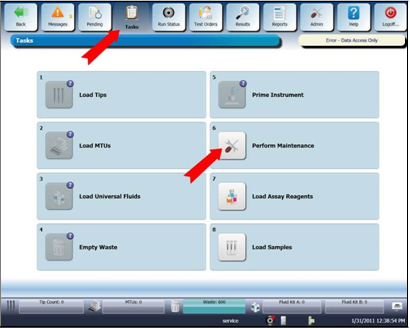
 Select Tasks on the Menu Bar and then select Perform Maintenance on the Tasks screen.
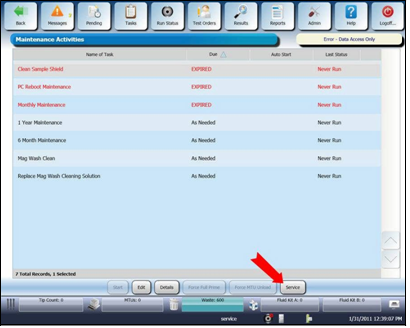
- Select Service on the Maintenance Activities screen.
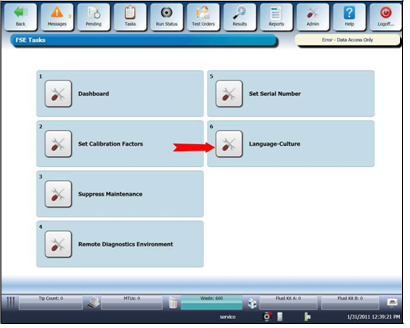
- Select the Language-Culture button on the FSE Tasks screen.
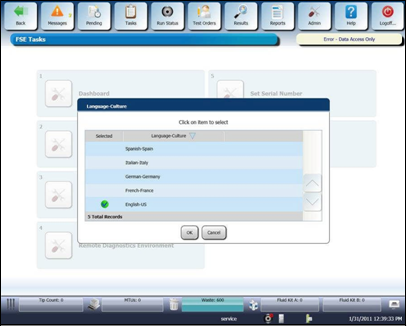
- Select the appropriate language from the Language Culture window.
- Select OK.
- Perform other SW changes and configurations, then restart the Panther Main SW.

NOTE—Before restarting the Panther Main SW, continue to Panther GUI Software Configuration. - Ensure that the system restarts in the selected language.
- Select Help on the Menu Bar.
- Ensure that the Help functionality displays in the selected language.
- Ensure that the system is not in the Service account or in the FSE Shield software mode before returning the system to the customer.
 button at the top of the page to send feedback, comments, or change requests.